
How to Stay Consistent on Social Media Without a Video Team
How to Stay Consistent on Social Media Without a Video Team
You do not need more people to post video every week. You need a simple system you can keep doing.
If I had to boil this down, I’d say this: post less, plan more, batch your work, reuse each video, and keep approvals simple. For most small teams, 2 posts per week is a good place to start. And one batch session can cover 2–4 weeks of content.
Here’s the short version:
- Pick a pace you can keep up with instead of aiming too high
- Choose 3–5 topic buckets so you always know what to post
- Use the same few video formats to cut planning time
- Batch plan, record, edit, and schedule in one cycle
- Turn one master video into platform versions for TikTok, Reels, Shorts, LinkedIn, and X
- Use AI for editing and versioning, not for the main idea
- Keep one approver and one shared review board so posts do not stall
- Review results each month and do more of what worked
A lot of teams quit because they try to post 5–7 times a week before they have a working process. That is usually the problem. A smaller plan that lasts beats a bigger plan that falls apart.
In other words: consistency comes from repeatable steps, not a full video crew.
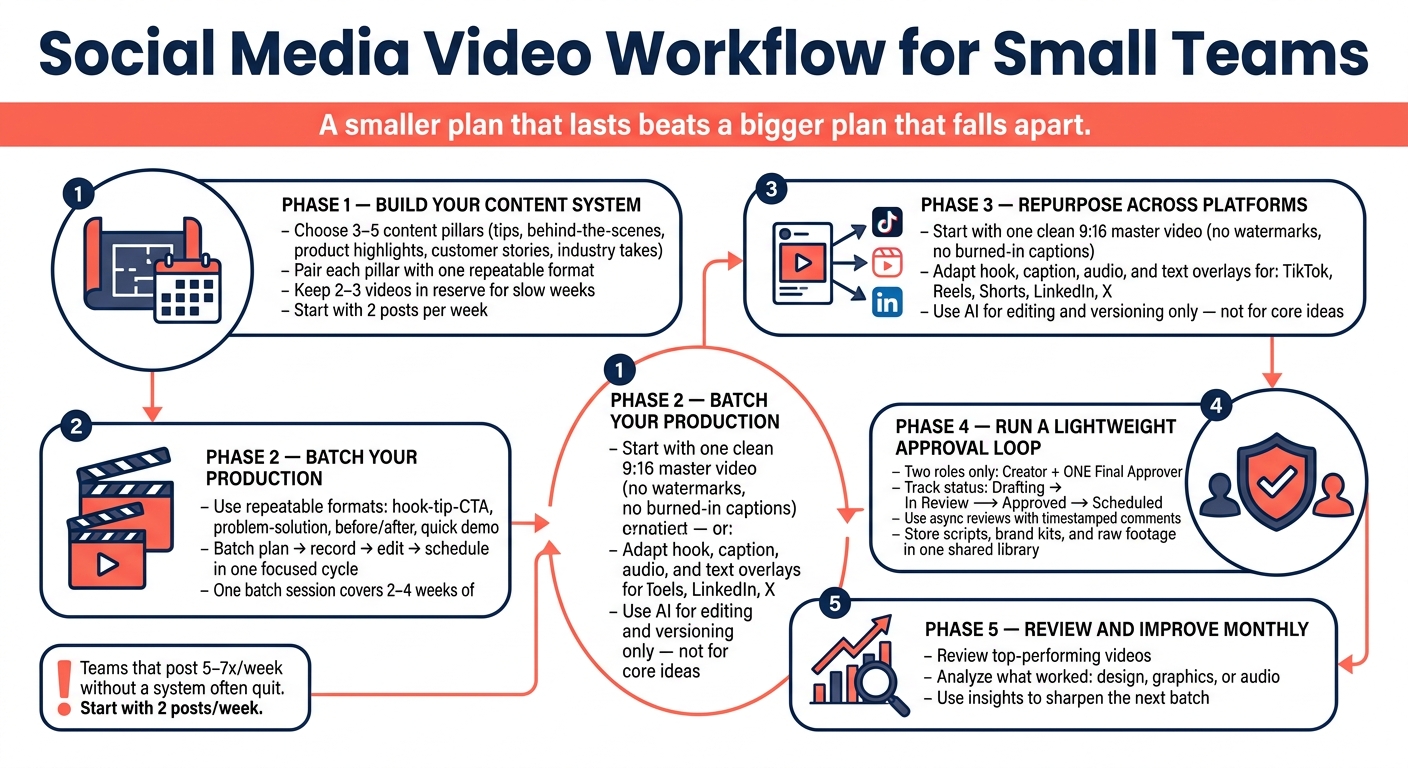
Social Media Video Workflow for Small Teams: A Simple Repeatable System
Build a Simple Content System Before You Start Filming
Once you’ve set your posting cadence, put a simple system in place so you know exactly what to make each week.
Choose 3–5 content pillars that line up with what your brand talks about on a regular basis. That might include tips, behind-the-scenes, product highlights, customer stories, or industry takes. The goal is simple: give yourself a small set of themes you can come back to again and again.
Then pair each pillar with one repeatable short-form format. That way, you’re not staring at a blank page every time it’s time to post. One pillar might work best as a quick talking-head video. Another might fit a product demo or a screen-recording breakdown. Same theme, same format, less guesswork.
From there, drop those posts into a simple weekly calendar. And give yourself a little breathing room by keeping two or three ready-to-publish videos in reserve for weeks when production slips.
Once your pillars are mapped out, repeatable formats make batch production much easier and a lot less chaotic.
Use Repeatable Formats and Batch Your Production
With your pillars and calendar set, turn them into a repeatable production block.
Use Formats That Cut Ideation Time
Starting from scratch every week slows you down. Repeatable formats solve that because they give you a structure you can fill in instead of a blank page.
Use simple formats like:
- hook-tip-CTA
- problem-solution
- before/after
- quick demo
Once you lock in the format, templates make each post easier to finish. Templates for opening lines, captions, and closing language cut decision time and help you turn one idea into a finished post much faster.
Batch Planning, Recording, Editing, and Scheduling in One Workflow
Batch planning, recording, editing, and scheduling in one focused cycle instead of bouncing between tasks every day. That shift alone can take a lot of pressure out of content production.
One batch can cover 2–4 weeks of posts, which makes it easier to stay consistent without constant day-to-day scrambling.
Move through each phase in order:
- plan
- record
- edit
- schedule
Use AI Tools and Repurpose One Video Across Every Platform
Once your core video batch is done, AI can help turn one approved asset into multiple versions for different platforms. The key is simple: finish one master video first, then use AI to speed up the platform edits. It can save time, but it shouldn't replace your judgment.
Use AI to Produce More Without Losing Brand Control
Use AI for editing, versioning, and publishing, not for deciding the main idea. That part still needs a human hand.
Before you use any tool, set clear guardrails. Write down your brand voice, visual style, and approved language. That way, your team has something concrete to follow instead of guessing on the fly.
A few rules matter here:
- Use avatar tools only for approved spokespeople, training clips, or draft versions.
- Set disclosure rules for AI-generated content.
- Get written consent before voice cloning.
Those guardrails help protect your brand and your audience's trust.
Once those rules are in place, you can repurpose each master video with a lot more control and consistency.
Adapt a 9:16 Master Video for TikTok, Reels, Shorts, LinkedIn, and X
Start with a clean vertical master: a 9:16 file with no burned-in captions, no watermarks, and no platform-specific stickers. Think of it as your source file. It gives you one clean asset to shape for each channel instead of reposting the exact same video everywhere.
From there, use one approved master and localize it for each platform. Keep the 9:16 master locked, then tailor the hook, caption, audio, and text overlays for TikTok, Reels, Shorts, LinkedIn, and X. Only the platform edits should move through review, not the master itself.
Set Up a Lightweight Approval Loop and Review Monthly
Once you've repurposed the main video for each platform, move every version into a simple approval flow so nothing gets stuck right before publishing.
Use Async Reviews, Clear Deadlines, and One Approval Record
Start with two roles: a Creator and a Final Approver. Pick ONE Final Approver, usually the Social Media Manager or Brand Lead, so you don't end up with mixed feedback pulling the post in different directions.
Track each asset with simple status labels: Drafting → In Review → Approved → Scheduled. Keep everything on one shared approval board so the whole team can see where each video stands. Then record the final approval there too.
Use async review instead of chasing live meetings. Keep comments in one place, and use timestamped notes so people can point to the exact moment they mean.
Store scripts, brand kits, and raw footage in one shared library. When reviewers can find what they need fast, one of the biggest causes of delay starts to disappear.
After each month's posts go live, use the approval log and performance notes to sharpen the next batch. Review the videos you published, spot the top performers, and look closely at what worked best - design, graphics, or audio.
FAQs
What if I can only post once a week?
Posting once a week is a solid way to stay consistent without letting content take over your calendar.
To make that weekly post work harder, put your energy into high-quality, evergreen content. Then turn that same piece into shorter clips or text summaries for other platforms.
That way, you stay visible in more places without making production a full-time job.
How long should a batch session take?
The provided information does not specify an ideal length for a batch session.
The best timing depends on your content production process and what you need to get done.
Which videos should I repurpose first?
Start with high-performing evergreen content. Use videos that already clicked with your audience. They’ve already shown they can hold attention, which gives you a strong starting point.
Focus on longer pieces like webinars, podcast episodes, or deep-dive tutorials. You can slice those into short clips for Instagram Reels, TikTok, and YouTube Shorts. That way, you can post on a steady rhythm without making every piece from scratch.