
AI Character Story Prompts for Product Ad Videos
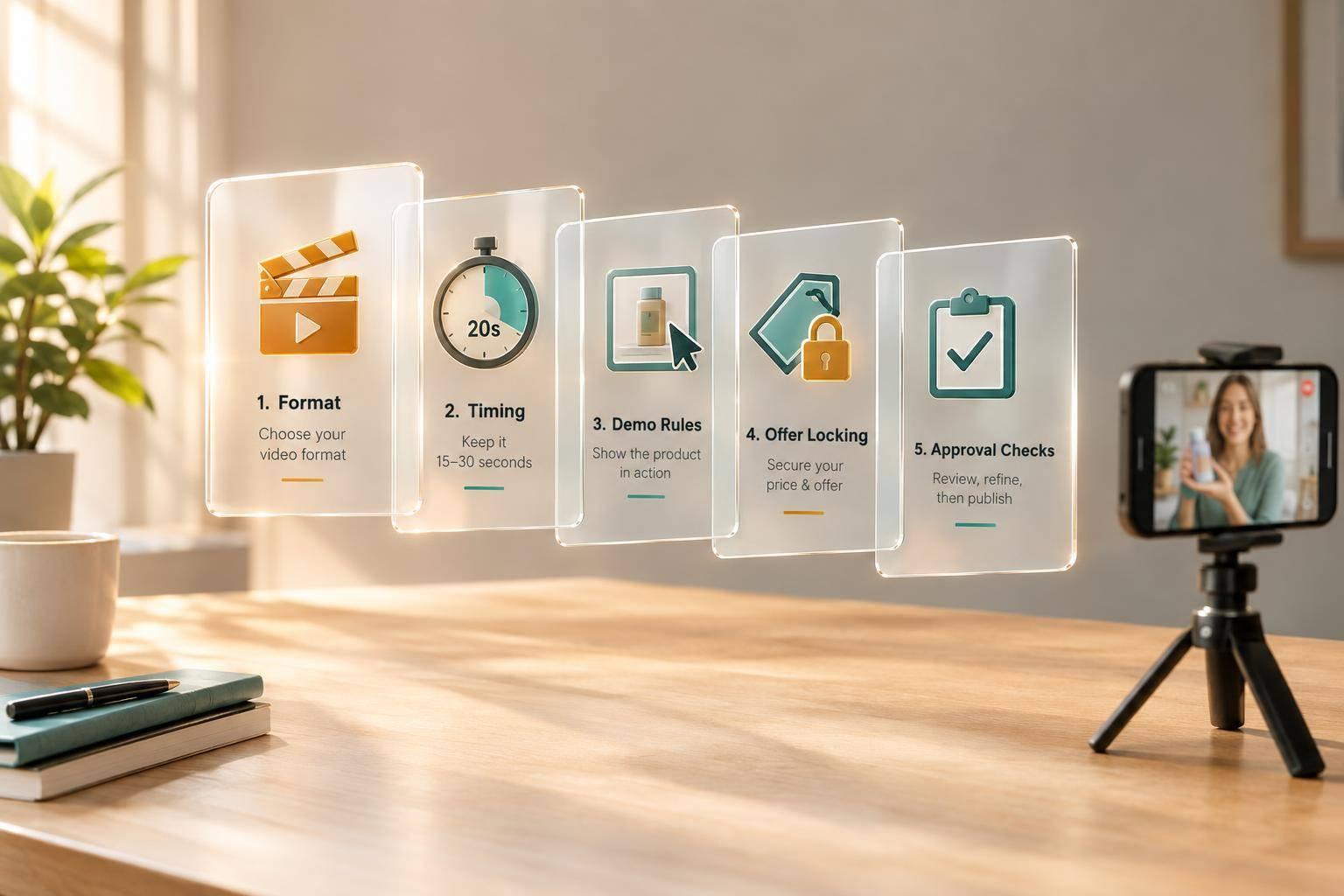
AI Character Story Prompts for Product Ad Videos
I build AI character ads around one goal, one problem, and a product shown solving it. For a 30-second video, I use 0–3 seconds for the hook, 3–10 for the problem, 10–25 for the demo and proof, and 25–30 for the offer and one call to action (CTA).
I choose from six story formats, based on what the ad needs to show:
- Everyday problem: A customer uses the product to fix a familiar frustration.
- Transformation: A before-and-after sequence shows a supported result.
- Discovery: A character finds the product and puts it to use.
- Under pressure: A deadline adds tension while the demo shows the solution.
- Testimonial and demonstration: A labeled AI presenter pairs product use with approved customer feedback - not invented personal experience.
- Premium cinematic narrative: An AI guide connects the brand’s mission to product use and proof.
My prompt names the character, pain point, shot order, product-use steps, supported result, exact offer, and final frame. I keep character and product references consistent, use 9:16 framing, and add approved text and logos during editing.
Before publishing, I check claims, offer terms, AI disclosures, and phone readability. <u>Script approval is not finished-video approval.</u> Then I save the approved prompt for reuse and use post results to guide the next batch - without changing verified product facts.
Build a Reusable Character-Story Prompt
Before writing dialogue, define who the character is, what they want, and how they act. For B2C, use a customer viewers can relate to. For B2B, use an expert they can trust. Keep appearance, clothing, and setting consistent across scenes. Use the framework below to carry those details across every format.
Show the pain point clearly: what’s stopping the character from reaching their goal? Separate product action from proof - first show what the character does, then show the result viewers can see. Keep that result within what the product can support.
Use this fill-in framework across all formats in this article:
Character: [Role], trying to [goal], with a [personality] manner. Appearance: [realistic or stylized character, clothing, and defining features]. Setting: [the location where the problem happens].
Pain point: [Specific frustration blocking the goal].
Scene order: [Hook/pattern interrupt] → [visible problem] → [product-use action] → [supported benefit] → [offer line] → [ending frame].
Product-use action: [Exact physical steps the character performs with the product].
Supported benefit: [Visual proof of the result/transformation], shown through [observable result or verified proof].
Exact offer line: “[Offer wording, including any applicable terms].”
CTA: “[One exact command].”
Ending frame: [Logo and product shot], with “[exact offer text]” and “[matching CTA text].”
Reuse the character profile while changing the scene order. Keep the offer wording exact, and repeat the same CTA in the ending frame. Next, set timing, visual direction, and product limits.
Set Timing, Visual Direction, and Product Constraints
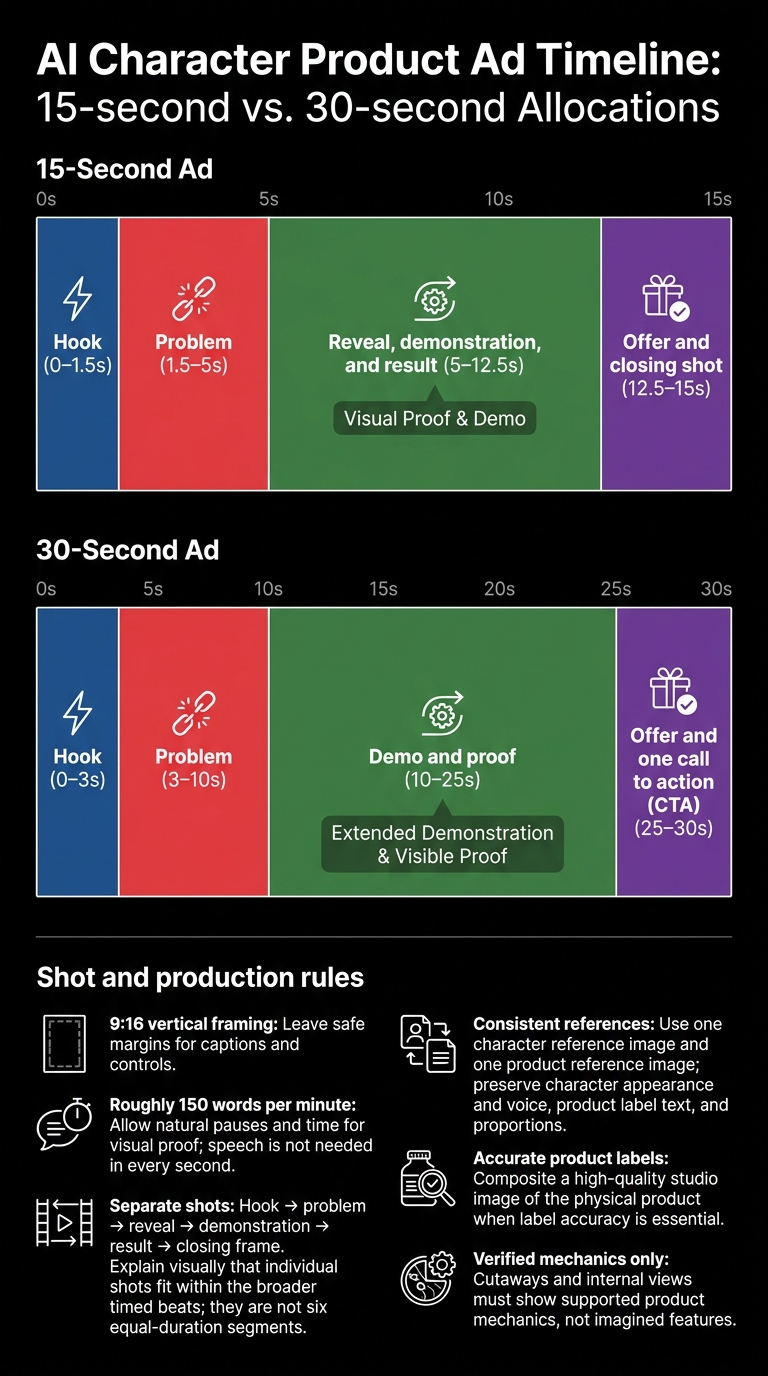
AI Product Ad Timing: 15 vs. 30 Seconds
Once the character prompt is set, lock in the timing and shot rules. Give each story beat a time slot. For a 15-second ad, allot 0–1.5 seconds to the hook, 1.5–5 to the problem, 5–12.5 to the reveal, demonstration, and result, and 12.5–15 to the offer and closing shot. Make the product-use action easy to follow instead of squeezing in more scenes.
Specify 9:16 vertical framing for every shot, plus camera movement and lighting. Leave safe margins for captions and controls.
Write the exact dialogue for each timed shot and aim for roughly 150 words per minute. Allow time for natural pauses and visual proof. You don’t need speech in every second.
Add one character reference image and one product reference image. Keep the character’s appearance and voice, along with the product’s label text and proportions, consistent across shots. When the label must be accurate, composite a single high-quality studio image of the physical product into the scene rather than asking AI to redraw it.
Split complex sequences into separate shots. Give the hook, problem, reveal, demonstration, result, and closing frame their own shots. Use cutaways or internal views only to show verified product mechanics - not imagined features. Apply these timing and shot rules to every prompt format that follows.
1. Relatable Customer With an Everyday Problem
Build the story around a familiar workplace problem using this sequence: problem → product use → corrected result → offer → ending frame.
- Relatable office problem: Use an HR manager stuck correcting timesheets at 9:00 p.m. on a Friday.
Prompt format: Cast an HR manager correcting recurring timesheet errors at 9:00 p.m. on a Friday. Show the frustration, introduce the product, demonstrate the correction workflow, and end on the manager reviewing the corrected entry. Use one clear offer line, one matching CTA, and a closing frame with the product image, brand name, and offer line.
Use a fictional character - not a testimonial - and keep the result believable. Show how the workflow fixes the error rather than relying on the manager’s reaction to prove the product works.
2. Character Transformation Story
The everyday-problem format sells convenience. This format sells visible change.
A before-and-after transformation works best for B2C products with results people can see, such as skincare, fitness, or home products. Use it when you can show the product’s result on camera rather than just explain it.
Prompt format: Define the character’s role, specific frustration, before state, product-use action, visible after state, exact offer line, and CTA. Follow that scene order, ending with a logo, product shot, offer line, and CTA. Keep the character consistent.
Keep the after state within the product’s actual claims. Show the character’s relief without overstating the change.
3. Character Discovery and Product Reveal
Use this format when a character finds the product while facing a problem, then shows it working on camera.
Prompt format: Define the character’s role and everyday pain point. Open with a striking visual, establish the frustration, then show discovery, a close-up product reveal, and the first visible result. End with the approved offer line, product, and matching CTA in the final brand frame.
Keep the camera on the product in action, not the character’s face. Use cutaways only to show verified product mechanics. Never suggest results or advantages that haven’t been proven.
4. Character Under Pressure
Use pressure to give the story urgency and a firm cutoff.
Friday Night Payroll Deadline
Prompt format: Create a 30-second story about a [character role] at 9:00 p.m. on Friday, facing [deadline] and [pain point]. Follow this scene order: pattern interrupt → problem → product use → result → offer → brand frame. Show the character using [product] to perform [product-use action] step by step, then show [verified outcome]. End with [exact offer line], [one clear CTA], and [ending frame with product, logo, offer, and matching CTA].
Keep the deadline in the scene - not the offer. Let it build tension while the product use supplies the proof. Use only verified speed claims.
5. Character Testimonial and Demonstration
AI Presenter With Verified Customer Feedback
Use this format when the ad needs a speaking face, but the proof must remain clearly synthetic and based on customer reviews.
Spell out the character’s role, scene order, product use, pain point, offer line, and ending frame. An AI spokesperson shares an approved customer quote while demonstrating the product. The spokesperson plays the character; the quote or overlay provides the customer proof.
Prompt format: Create a 30-second video featuring one clearly identified AI spokesperson. Use the standard 30-second arc: 0–3 seconds hook, 3–10 seconds pain point, 10–25 seconds demo and proof, 25–30 seconds offer and CTA. Use a pattern-interrupt hook for the target audience and name the pain point without claiming personal experience. Show close-ups of correct product use following the brand’s instructions; pair the action with one verified benefit plus one approved customer quote or rating overlay. Deliver one approved offer line and one clear CTA. End with the product, logo, and matching CTA.
Use the next format when the story needs a more cinematic character arc instead of a presenter-led proof sequence.
Keep the proof separate from the spokesperson; never invent a review or “I tried this” story. Have the brand review both the quote and the demo before publishing.
6. Premium Cinematic Character Narrative
Use this format when an ad needs more brand depth than a direct demo or testimonial can provide.
The Brand Origin Trailer
Turn your brand’s history or mission into a 30-second cinematic story led by an AI guide. The goal is to build brand authority and long-term trust. Sun Scroller’s cinematic storytelling format pairs AI-generated cinematic B-roll with voiceover for origin stories.
Prompt format: Define the character role as an AI guide who introduces the problem, shows the product, and closes on the offer; specify the pain point, exact product-use action, approved offer line, and ending frame. Use the existing 30-second structure with this scene order: hook → frustration → product-in-use response → proof → offer → CTA, emphasizing brand mission, product use, and proof. Request cinematic B-roll and voiceover. End with a five-second brand frame that repeats the offer and CTA.
Let the product drive the story. Show it in use during the middle of the ad rather than filling that time with scenery. Keep dialogue minimal.
Once the story arc is set, lock the offer line and final frame to keep the ending accurate to the brand.
Write Clear Offers and Design the Final Brand Frame
Once the story is approved, lock in the offer details and closing frame. Verify pricing, eligibility, expiration dates, and key terms before writing the closing line. Use U.S. dollar and date formatting. Make sure the character’s final action, dialogue, voiceover, and on-screen text all match the approved offer. Choose one CTA that fits the final visual.
Make the closing frame the story’s final visual payoff. Specify where the product and logo will appear, use a clean background, and keep the product fully visible. Generate the scene first, then add approved text and logos during editing to avoid distorted lettering or incorrect brand details. Keep the offer, CTA, and any verified discount code readable inside the safe area, away from platform controls.
Test the frame on a phone with captions and platform overlays visible. Check that viewers can read it during playback and that every detail matches the approved terms. Don’t publish until the brand owner approves the final frame and offer. Move only approved versions into production.
Review Prompts for Believability and Brand Accuracy
Before generating, review each prompt with these checks.
Check cause and effect. Make sure the character’s pain point leads logically to product use, a believable result, and the CTA.
Match each shot to approved product references. Confirm that product handling is physically plausible and that product details follow the brand style guide.
Separate evidence from illustration. Verify claims against approved brand materials. Cutaway views, before-and-after visuals, and demo close-ups should show ONLY supported mechanics or results.
Check offer consistency. Review dialogue, captions, and the final frame for conflicting prices or terms. Keep the offer and single CTA readable on a phone. Use the final frame to catch any mismatch before approval.
For AI spokesperson ads, treat the performance as synthetic from the start. Label synthetic testimonials as dramatizations, not real customer proof. Check the on-screen disclosure, and keep the AI spokesperson’s performance clearly separate from approved customer review text.
Turn Approved Prompts Into a Recurring Video Workflow
Once approved, save each prompt as a reusable template with fixed fields for the character, product, and ending frame. Link the approved product reference images, and set the brand voice and style guide in month one.
Keep those fixed fields separate from the monthly inputs: pain point, scene order, product-use moment, offer line, and CTA. Save dated copies of offers and product references so outdated terms don’t slip into new videos.
Use four stages: briefing, production, approval, and posting. During briefing, decide which character stories to reuse and which hooks to change. Track the brief, script, edit, and final approval as separate versions. Approving the script does not mean approving the finished video.
Sun Scroller supports monthly production of AI avatar videos, synthetic UGC, product ads, and cinematic videos. It also offers brand review tools, publishing, and per-channel analytics.
After posting, use traffic and engagement data to see which prompts perform best. Update the prompt library with those findings to guide the next batch.
Conclusion
Match the story format to the buying moment: everyday problem, transformation, discovery, pressure, testimonial, or premium cinematic narrative. All six use the same core prompt fields: character role, pain point, scene order, product use, offer line, and ending frame. This makes each ad reusable and easy to direct. Only the pain point, scene order, and offer change between formats.
Keep the prompt focused on one character goal, one pain point, one scene order, one product-use action, one offer line, and one ending frame. Check the offer details before publishing, and end the ad with one clear branded CTA. These boundaries keep the story controlled, believable, and ready for production, with the product’s value clear on screen.
FAQs
Which story format fits my product best?
Match your visuals to your marketing goals:
- Build trust fast: Use Product X-Ray and Cutaway visuals to show how your product works.
- Tell your brand’s origin story: Use cinematic AI storytelling to create a movie-trailer-style narrative.
- Improve search visibility and earn AI assistant citations: Use Sun Scroller’s 5- to 10-minute educational explainers to answer specific customer questions.
During your intake call, Sun Scroller helps you choose the best mix for your brand’s goals.
How can I fix inconsistent AI product demos?
Build your demos using your brand’s own materials and tone. If a video misses the mark, choose a service with a redo policy so you can adjust the avatar, voice, or script.
Sun Scroller builds every element from your brand assets and offers a free redo on any video that doesn’t meet your standards. That helps keep your product demos accurate and in line with your brand identity.
How can I test hooks without changing product claims?
Use an AI Hook Matrix approach: keep your brand voice, style guide, and product messaging fixed, then swap visual hooks and voiceovers. You can test different opening sequences without changing your product’s value proposition.
Sun Scroller turns your existing brand material into ad variations, helping you find winning combinations fast - without rewriting your core claims for every test.