
AI Talking Avatars for Multilingual Product Ads
AI Talking Avatars for Multilingual Product Ads
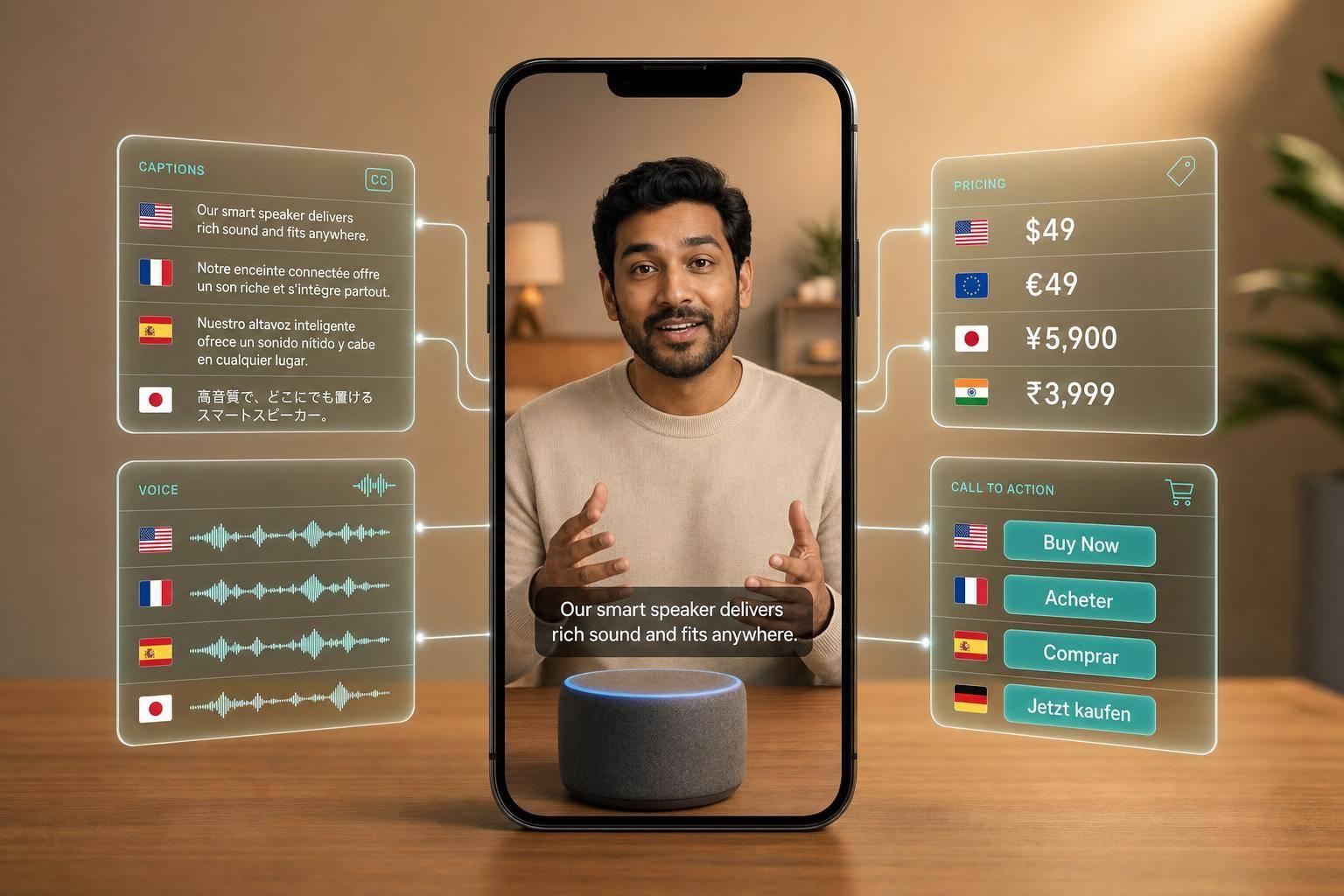
If one product ad needs to work in many markets, I would not rebuild it from scratch. I would lock one master version, then change only the parts that affect how people buy: language, voice, captions, prices, units, disclaimers, and CTA text.
That matters because video already drives sales. 85% of consumers say video has convinced them to buy a product. But a translated ad is not always a local-ready ad. The words may be right, while the tone, pronunciation, pricing format, or CTA still feels off.
Here’s the short version:
- Translation changes words. Localization changes how the ad lands.
- I keep approved scenes the same and swap only the market layer.
- I separate fixed assets from editable assets before production starts.
- I review each market version for pronunciation, pace, tone, lip sync, and text formatting.
- I test hooks, voices, and language versions one variable at a time.
- I export cuts for each platform, like 9:16 for TikTok and Reels and 16:9 for YouTube.
- I track results by language + channel so I can see what drives conversions.
The big idea: one well-planned ad can turn into many market-ready versions without reshoots, as long as the master script, review flow, and text layers are set up the right way.
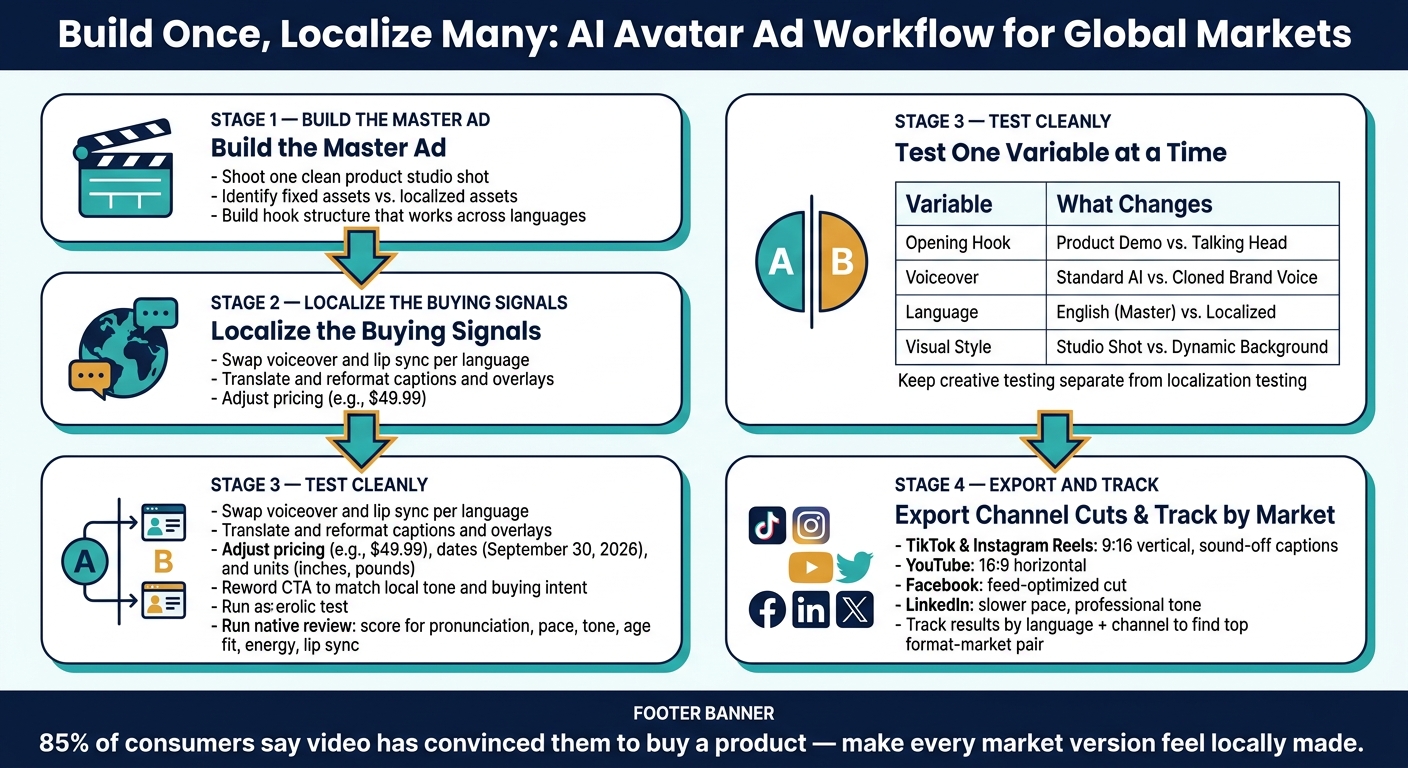
To make that work, I focus on a simple system: build once, localize the buying signals, test cleanly, and reuse what is already approved.
Build Once, Localize Many: AI Avatar Ad Workflow for Global Markets
Build the master product ad before you localize
Lock the master cut before you localize. That way, each market version only needs changes to the language, voice, text, and CTA. From there, split the ad into two parts: fixed assets and market-specific layers.
Use a hook structure that holds up across languages
Build the opening around a repeatable hook structure, not a one-off script. A testing matrix of hook and voice combinations helps you spot which pairings win across markets. You can also use ultra-realistic AI presenters with natural pauses and voice cloning, so the same avatar works across multiple languages.
Lean on product proof. Product X-ray shots, cutaway visuals, and before-and-after footage show value fast without leaning too hard on dialogue. It also helps to lock a brand voice guide before you make variants, so each localized version stays aligned.
Plan fixed assets and localized assets from the start
Before you generate the ad, break the asset list into what stays the same and what changes by market.
| Asset | Fixed or Localized | How It Changes |
|---|---|---|
| Product studio shot | Fixed | Reused as the core visual |
| AI avatar / presenter | Fixed visual | Voice and lip sync localized per language |
| Backgrounds | Localized | Swapped with AI for different market looks |
| Visual hooks | Localized | Tested in multiple variants |
| B-roll footage | Fixed when reusable; localized when market-specific | Reused when it fits the story |
| Captions and text overlays | Localized | Translated and reformatted per language |
| Pricing and units | Localized | Adjusted for local currency and measurement units |
| CTA copy | Localized | Reworded to match local tone and buying intent |
The product studio shot is your core fixed asset. Shoot one clean version, then place it into different cinematic backgrounds so you can adapt the ad for each market without reshooting the product. That split keeps localization fast while the main scene stays the same.
Keep captions, prices, CTAs, and overlays in separate editable layers.
Next, localize the spoken language, on-screen text, and CTA without rebuilding the ad.
Localize language, voice, on-screen text, and CTA
Once your master ad is locked, localization means making each market version feel like it was made for that audience from day one, not just translated.
Choose language variants and voices that match the market
Start by choosing target languages based on market demand and audience fit. Then pick a voice that sounds native and fits how people in that market buy.
A good review process helps here. Score each voice for:
- Pronunciation
- Pace
- Tone
- Age fit
- Energy
- Lip sync
Match the voice to the platform. For TikTok, that often means a faster, sharper delivery. For LinkedIn, a steadier and more polished voice usually fits better.
Run every localized script through native review before rendering. Translation can get the words right, but it can still miss how the line feels. Native review helps catch tone issues and pronunciation misses before export.
Once the voice is approved, apply that same review logic to captions, pricing, and CTA text.
Localize captions, prices, dates, units, and overlays as a separate layer
Voice is only half the job. On-screen text needs the same market-specific treatment. Treat it as a separate editable layer, including captions, prices, dates, units, disclaimers, and CTA buttons.
For the U.S. market, use en-US formatting across every text element: prices as $49.99, large numbers with comma separators like 10,000, dates written out as September 30, 2026, and imperial units like inches, feet, and pounds wherever measurements appear on screen. Keep overlays short and inside platform safe zones so they don't get clipped by the UI.
A weak CTA or a disclaimer that misses the mark can hurt conversion or stop an ad from getting approved. That's why the text layer needs to go through the same review workflow as the voice and script.
With voice and text localized, the next move is to reuse approved scenes and test which market versions convert best.
Reuse scenes, test variants, and cut for each social channel
Reusing scenes cuts production cost, testing helps you find the top variant, and channel-specific cuts make sure the ad fits where it runs.
Reuse approved scenes and swap only conversion elements
Once the language layer is approved, lock the scene and use it across markets. Keep those approved scenes the same in every language version.
What should change is the market-specific layer:
- Voiceover
- Captions
- Pricing
- Offer text
- Disclaimers
- CTA
Don’t approve any localized version until brand review signs off on the language and voice.
This approach helps you avoid reshoots and keeps every version aligned.
Test hooks, voices, and localization variables with a clear matrix
Keep creative testing separate from localization testing. If you mix both in one test, you won’t know what actually changed performance.
For creative testing, change one variable at a time. For localization testing, keep the creative fixed and change only the language or one market variable.
A simple matrix keeps things clean:
| Variable | Variant A (Control) | Variant B (Test) | Success Metric |
|---|---|---|---|
| Opening Hook | Product Demo | Synthetic UGC Talking Head | View-through Rate |
| Voiceover | Standard AI Voice | Cloned Brand Voice | Engagement Rate |
| Language | English (Master) | Localized (e.g., Spanish) | Conversion Rate |
| Format | Direct Response Ad | AI Podcast/Street Interview | Trust/Brand Sentiment |
| Visual Style | Studio Shot | Dynamic Background Placement | Click-Through Rate |
AI pipelines make this kind of matrix testing much easier to run.
Once you’ve picked the winner, cut that version for each platform.
Export channel-specific cuts for TikTok, Instagram, YouTube, Facebook, X, and LinkedIn
One master file won’t work everywhere. Start with the winning version, then adjust it for each channel’s format and pacing.
For TikTok and Instagram Reels, use a 9:16 vertical frame with localized captions and overlays for sound-off viewing. For YouTube, use a 16:9 cut. For Facebook, adjust the cut for the feed. For X, keep the message tight. For LinkedIn, tune the pacing and text placement for a professional audience.
Track results by both platform and market. That makes it much easier to spot which format-language pair converts best.
Build a repeatable workflow and lock in the key rules
Use a staged approval workflow for every language version
Once the channel cuts are final, lock the workflow that keeps each language version aligned.
Use the same monthly flow every time: Brief, Produce, Approve, Post.
Start by locking the master script. Then set which assets stay fixed and which ones change by market. From there, build reusable scenes, localize the voice and on-screen text, and send everything through review before publishing. If anything fails review, update it and run approval again before it goes live.
An async approval setup helps monthly publishing stay on track across markets. Services like Sun Scroller fit this approach, with async approval, brand review controls, and monthly publishing across YouTube, TikTok, Instagram, Facebook, X, and LinkedIn.
Lock the brand voice and style guide early. Every avatar, script, and voice should follow the same rules.
Conclusion: The core rules for scaling multilingual avatar ads
A small set of decisions shapes whether this system scales cleanly. Keep these rules fixed:
- Build a localization-ready master script and keep it reusable across markets.
- Localize, don't just translate. Voice, pricing, units, and CTA should match the market.
- Reuse approved scenes. Only swap the conversion layer: voiceover, captions, offer text, and CTA.
- Test hooks, voices, and localization variables in a controlled way. Keep the rest of the scene the same so you can see what changed performance.
- Report by language and channel to spot which market-format pair drives results.
Treat each monthly cycle as the setup for the next one. Use performance data to tighten the brand voice and style guide, then carry approved scenes into the next round.
FAQs
How do I know what to localize?
Start by defining your brand goals and target markets during the initial intake call. Then update your brand materials, including scripts and tone, so each language version stays in line.
Sun Scroller handles the technical side, including voice cloning and AI presenters, while you review and approve each part to make sure it fits your brand identity.
What should I test first in each market?
Start by testing different mixes of visual hooks and voiceovers so you can spot the best-performing creative early.
If you combine 20 visual hooks with 5 voiceovers, you can make up to 100 variants. That gives you a fast way to see what clicks with people. Sun Scroller can generate those variants and use per-channel analytics to show you what to refine before you scale.
How can I keep multilingual ads on-brand?
Start with a clear brand voice and style guide early in production. With Sun Scroller, each avatar, voice, and script is built from your brand materials and tone.
That helps keep the output aligned from the start instead of trying to fix things later.
Consistency also depends on a strong review process. You approve every piece before it goes live, and anything that doesn’t match your standards can be adjusted before publication.