
Best AI Video Services for Growing Brands in 2026
Best AI Video Services for Growing Brands in 2026
If your team needs more short-form video every month, the best choice depends on one thing: how much work you can do in-house. In this list, I’d split the market into three buckets: done-for-you services, build-it-yourself platforms, and editing tools.
Here’s the short version:
- Sun Scroller fits brands that want monthly video output with approvals, planning, and delivery handled for them.
- HeyGen and Synthesia fit teams making avatar-led videos.
- Creatify fits ecommerce brands turning product pages into ads.
- CapCut, Descript, and VEED fit teams editing footage themselves.
- InVideo AI fits teams that want prompt-based draft videos fast.
If I were choosing, I’d use these checks first:
- Monthly volume: How many videos do you need every month?
- Format needs: Do you need 9:16, 1:1, or 16:9?
- Source footage: Do you already have clips, or do you need videos made from scratch?
- Approval flow: Who needs to sign off before posting?
- Publishing: Who will schedule and post?
- Language support: Do you need more than one language?
- Reporting: Do you need channel-level data?
- Team time: How many hours per week can your team spend on video?
A 2026 buying rule I’d keep in mind: the more steps your team owns, the more output tends to slow down. So if you need steady volume, a managed service may fit better than a self-serve tool.
Quick Comparison
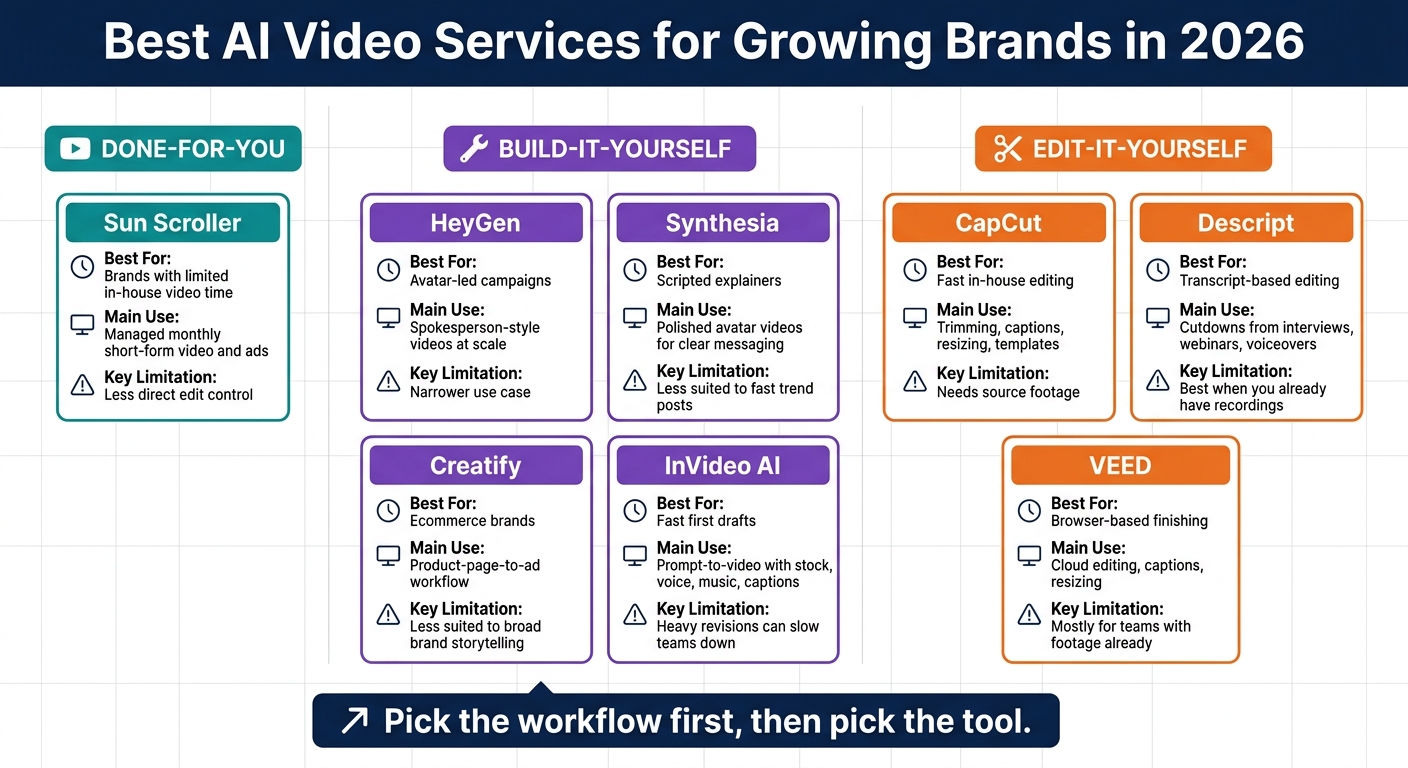
Best AI Video Services for Growing Brands in 2026: Side-by-Side Comparison
| Service | Best For | Main Use | Limitation |
|---|---|---|---|
| Sun Scroller | Brands with limited in-house video time | Managed monthly short-form video and ads | Less direct edit control |
| HeyGen | Avatar-led campaigns | Spokesperson-style videos at scale | Narrower use case |
| Synthesia | Scripted explainers | Polished avatar videos for clear messaging | Less suited to fast trend posts |
| Creatify | Ecommerce brands | Product-page-to-ad workflow | Less suited to broad brand storytelling |
| CapCut | Fast in-house editing | Trimming, captions, resizing, templates | Needs source footage |
| Descript | Transcript-based editing | Cutdowns from interviews, webinars, voiceovers | Best when you already have recordings |
| InVideo AI | Fast first drafts | Prompt-to-video with stock, voice, music, captions | Heavy revisions can slow teams down |
| VEED | Browser-based finishing | Cloud editing, captions, resizing | Mostly for teams with footage already |
So the core takeaway is simple: pick the workflow, then pick the tool. That makes this list much easier to use.
1. Sun Scroller
Sun Scroller is built for brands that need a managed, repeatable video production system. It covers the full process: initial brand setup, monthly planning calls, production, approval workflows, and final delivery. Your team stays involved, but you don’t have to run the whole production machine yourself.
Each month, Sun Scroller delivers a set amount of short-form social videos and video ads. That can include avatar-led videos, UGC-style content, product videos, and localized creative. The mix is planned around platform needs and campaign goals, which helps keep the output consistent and on-brand without leaning on an in-house filming or editing team.
Sun Scroller makes sense for brands that need recurring short-form video output but don’t have the internal bandwidth, a steady creative pipeline, or enough production capacity to keep it going month after month. It’s a strong fit when speed, consistency, and steady output matter more than one-off videos.
2. HeyGen
HeyGen is built for avatar-led video production. It works best when a brand needs spokesperson-style videos at scale without putting real people on camera.
The platform creates short-form videos with AI avatars and synced voiceovers. It also supports multiple languages and lets teams create custom avatars. That makes it a strong fit for marketing teams that need steady, talking-head video for social media, product explainers, or localized campaigns - without the cost of live shoots.
If HeyGen is about avatar-based output, the next service leans more toward a managed production setup with a different angle.
3. Synthesia
If your team wants more control over the script, Synthesia is a strong pick for polished video content.
It supports vertical 9:16 videos, so you can use it for TikTok, Instagram Reels, and YouTube Shorts. That said, it works best for educational shorts and product explainers.
It’s not the right tool for trend-driven posts that change by the hour. Instead, Synthesia fits teams that care more about clear, controlled messaging than chasing fast-moving social trends.
4. Creatify
Creatify helps ecommerce brands turn product pages into short-form ad variants for TikTok, Instagram Reels, YouTube Shorts, and Facebook. The whole workflow is built for fast product-ad production. So if you're making product-led social ads, it fits well. If you need broad brand storytelling across many formats, that's not really its lane.
The main feature is URL-to-video automation. You paste in a product URL from Shopify, Amazon, or Etsy, and Creatify's AI pulls in product images, descriptions, and key features to build a draft video on its own. After that, the platform creates multiple scripts and storyboards for short-form ads.
Brand Kit
Creatify's Brand Kit stores logos, colors, and fonts so each variant stays visually consistent. If your team wants more hands-on editing control, the next service moves away from product-page automation and into a broader editing workflow.
5. CapCut
CapCut shifts the workflow away from automated ad generation and toward hands-on editing speed.
It’s a fast, creator-friendly editor for brands that need to clean up short-form social video without getting stuck in a heavy post-production process. You can trim clips, add captions, resize videos for Reels, Shorts, and TikTok, and use templates or basic effects with very little friction.
That makes it a good fit for teams that post often and want simple collaboration while keeping direct control over the edit.
If your team wants to edit both video and audio from a transcript, the next option goes further into text-based post-production.
6. Descript
Descript takes video editing a step further. Instead of working on a packed timeline, your team can edit from the text itself.
It’s a transcript-based editor, which means you can cut filler words, add captions, and pull short clips for Reels, Shorts, and TikTok just by editing the transcript. No endless timeline scrubbing. No hunting for the exact second someone said the line you want.
That’s a big deal for brands working with interviews, webinars, and voiceovers. A long recording can turn into polished social cutdowns fast, without the usual back-and-forth of manual editing.
If your team wants a more automated way to make ads, the next tool goes in a different direction.
7. InVideo AI
InVideo AI turns a prompt into a draft that includes the script, stock footage, music, voiceover, and captions. It works well for teams that need fast, social-first drafts for TikTok, Instagram Reels, or YouTube Shorts.
Workflow
You start with a brief, and InVideo AI turns it into a video draft from a prompt. That makes it a good fit when speed matters and you need something on the screen fast.
Brand Control
Brand Kits help keep drafts on-brand. That matters when multiple people are producing content and you want the final output to look and sound consistent.
Revision Cost
Prompt-built drafts can cut first-pass production time. But if your team needs a lot of changes after the draft is made, publishing can slow down.
For teams that want more hands-on editing after generation, the next service shifts more in that direction.
8. VEED
VEED is a browser-based editor that turns raw footage into polished, caption-ready clips. It works well for brands that already have video on hand and need to rework it fast for social channels, without dealing with local installs.
Workflow
Teams can upload clips from any device and work together in the cloud. VEED also supports 4K rendering. After that, teams can jump right into formatting and captioning for each platform.
Short-Form Output
VEED resizes clips for TikTok, Instagram Reels, YouTube Shorts, LinkedIn, Facebook, and X. Its auto-subtitles are also highly accurate.
That makes VEED most useful as a finishing tool for brands that already have footage and need fast, platform-ready edits. It helps show where VEED fits in the bigger mix of production, editing, and approval workflows.
Strengths, Drawbacks, and Practical Limits by Service Type
Some services take care of the full production process for you. Others give your team a platform to make videos in-house. And some focus mostly on editing footage you already have.
For growing brands, that’s the real issue: how much production work can your team take on before output starts to slow down?
The simplest way to compare these options is by workflow model, not a long feature-by-feature checklist.
| Service | Workflow Model | Best Advantage | Main Limitation | Best Fit |
|---|---|---|---|---|
| Sun Scroller | Done-for-you | Short-form video production with AI avatars, synthetic UGC, brand review controls, and publishing support across major social channels | Less hands-on control than building and editing videos in-house | Brands that need approved output without in-house filming |
| Build-it-yourself platforms | Build-it-yourself | Give teams the setup to create videos internally | Need more time and internal ownership to get steady results | Brands with dedicated creative resources |
| Editing tools | Edit-it-yourself | Useful for captions, resizing, and polishing existing footage | Rely on footage you already have | Teams repurposing content for multiple channels |
Use this model to match each service type to your team’s capacity, then compare fit in the final recommendations.
If your brand doesn’t have a dedicated video team, self-serve tools can easily turn into the bottleneck. In many cases, services that remove most of the production drag lead to steadier output at scale.
How to Choose: Final Recommendations and a Selection Checklist
Start with the workflow model above, then use the checklist below to make sure the fit is right.
The choice comes down to one simple question: how much production work can your team handle each month?
If the answer is “not much,” a done-for-you service removes the biggest bottleneck. If your team can handle scripting, editing, and publishing, a self-serve workflow gives you more control. Editing tools make the most sense when your team already has footage and mainly needs help speeding up post-production.
Once you know your team’s capacity, look at format, ownership, and publishing needs.
Use this checklist to confirm fit:
| Decision Factor | Questions to Answer |
|---|---|
| Monthly video volume | How many videos do you need each month? Can your team produce that on a steady basis in-house? |
| Required formats | Which aspect ratios do you need: 9:16, 1:1, or 16:9? |
| Source assets | Do you already have footage, or do you need visuals made for you? |
| Approval sign-off | Who approves content, and do they review it async or live? |
| Publishing | Who handles scheduling and posting? |
| Language needs | Do you need multilingual voiceover or captions? |
| Reporting needs | Do you need channel-level reporting? |
| Team production time | How many hours per week can your team spend on video production? |
Answer those questions, and the right model usually becomes pretty clear. If most of your answers point to limited in-house capacity, go with a done-for-you service. If your team has the time and wants to own the process, use a self-serve workflow.
FAQs
How do I choose between done-for-you and self-serve video tools?
Choose based on your brand’s production needs, the resources you have in-house, and how much control you want over the final result.
Self-serve tools make the most sense for teams that want flexibility, fast turnaround, and direct control. You’re in the driver’s seat.
Done-for-you services are a better fit if you’d rather hand off production and keep quality and consistency high without carving out extra time or relying on in-house video editing skills.
What should I check before committing to an AI video workflow?
Make sure the workflow fits your production setup and works with the hardware and systems you already use, including lighting, projection, and atmospheric gear.
It should also match your creative goals, handle complex assets and automated triggers, scale with your production needs, and give you enough control over output quality and technical specs.
Can AI video tools keep content on-brand across channels?
Yes. AI video tools can help keep content on-brand across channels by putting visual assets, voiceovers, and editing styles in one place.
That makes it easier to use the same look, tone, and message across platforms. With standardized templates and automated approval workflows, brands can scale content for TikTok, Instagram Reels, and LinkedIn without their messaging or visuals drifting off course.