
AI Dubbing vs Subtitles for Social Video
AI Dubbing vs Subtitles for Social Video
I’d start with subtitles for visual demos, AI dubbing for speech-led videos, and both when viewers need audio and text. Whatever you choose, make the message clear with sound off in the first 3 seconds.
Here’s how I’d weigh the options for product ads, Reels, and Shorts:
Quick Comparison
| What I’d compare | Subtitles | AI dubbing | Both |
|---|---|---|---|
| Best fit | Visual-first clips | Presenter-led stories and tutorials | Ads and lessons needing speech and text |
| Sound-off viewing | Viewers can read the message | Needs supporting visuals or text | Viewers can follow captions |
| Viewer focus | Reading can distract from product details | Speech lets viewers watch the visuals | Text placement needs care |
| Production work | Translation, timing, and text layout | Translation, voice generation, timing, and mixing | Audio and text review |
| Quality checks | Meaning, readability, placement, and claims | Meaning, pronunciation, tone, timing, and voice rights | All checks, plus audio-text agreement |
I’d compare total cost per approved video and language, not just the price of a draft. Before publishing, I’d get human approval for translations, product claims, audio, and text - and keep captions on dubbed videos for accessibility.
Then I’d <u>test matched versions before scaling</u>: keep the hook, offer, audience, and placement the same, and compare watch time, completion rate, clicks, conversions, and production cost.
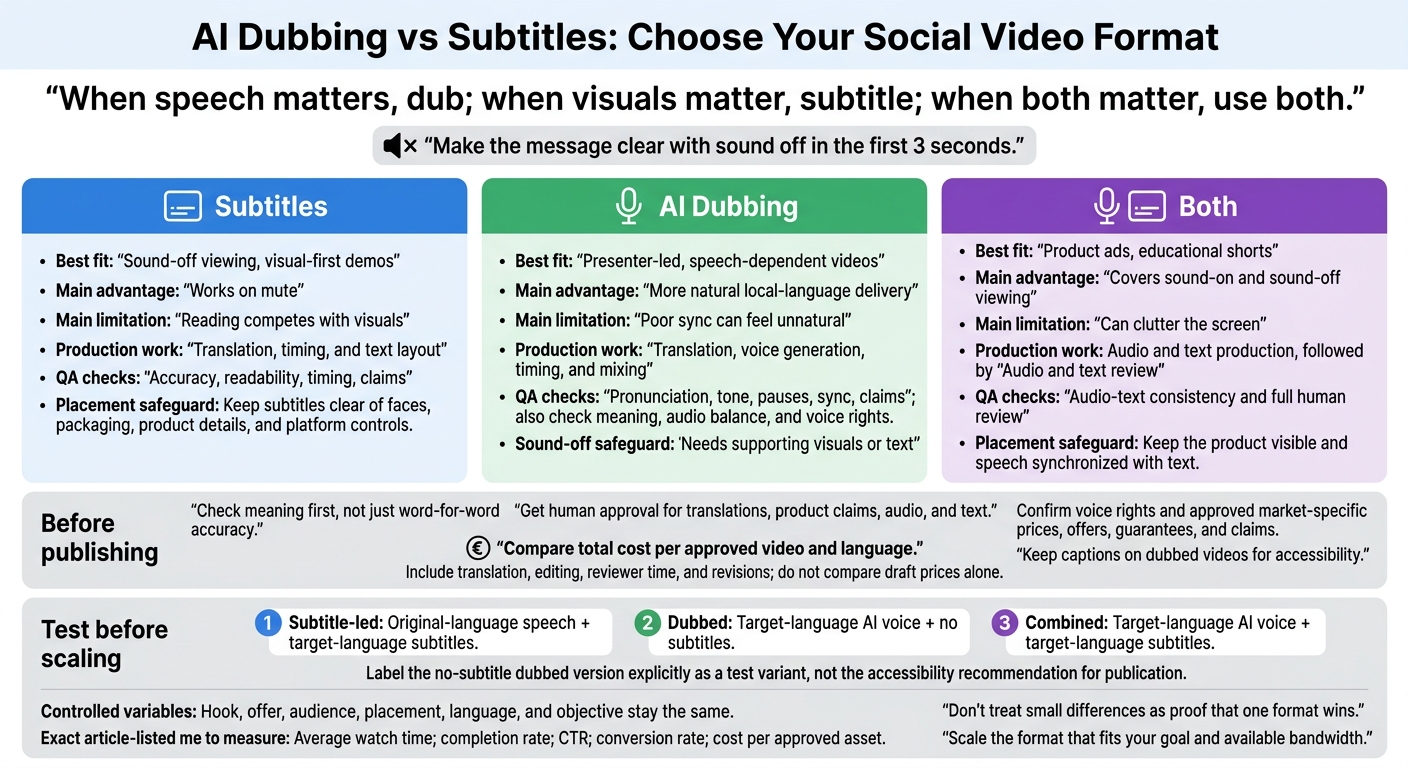
AI Dubbing vs Subtitles: Choose Your Social Video Format
AI Dubbing vs Subtitles: Key Differences
The right choice depends on the format and what viewers need to understand first. Use dubbing when speech carries the message; use subtitles when visuals do.
Watch Time and Message Clarity With or Without Sound
When viewers need to see product details, subtitles can help - or get in the way. They explain benefits without sound, but reading can pull attention away from a product close-up or transformation shot. Keep text clear of the area viewers need to inspect.
With sound on, dubbing lets viewers focus on the visuals instead of reading. But poor translation, unnatural pronunciation, or rushed voice timing can make the explanation harder to follow. With sound off, dubbed videos need supporting text or visuals that explain the message on their own.
Check meaning first, not just word-for-word accuracy. For subtitles, review readability and placement. For dubbing, check pronunciation, timing, tone, and audio balance.
Production Costs and Editing Time
The cheapest draft isn't always the cheapest finished video. Compare total cost per approved video and language, including translation, editing, reviewer time, and revisions.
Dubbing adds voice generation, synchronization, and mixing. Subtitle costs can also climb when longer translations need repeated timing and layout changes.
| Work stage | Subtitles | AI Dubbing |
|---|---|---|
| Preparation | Transcribe and translate speech | Adjust the translated script for spoken timing |
| Production | Time, style, and position text | Generate voice, synchronize speech, and mix audio |
| Revisions | Update wording, timing, and placement | Regenerate affected audio and recheck synchronization |
Choosing Formats for Product Ads, Reels, and Shorts
Choose the format based on what viewers need to understand first. A visual demo and a spoken tutorial need different treatment, even in the same feed. Consider how much the message relies on speech, how busy the visuals are, and whether viewers can follow with the sound off.
| Video Type | When Subtitles Fit | When AI Dubbing Fits | When to Use Both |
|---|---|---|---|
| Visual product demo | Short text explains features without interrupting the demo | Product steps need a voice-over | Viewers need to follow detailed visuals and instructions |
| Before-and-after ad | Labels explain the transformation | Narration gives context for the change | The payoff needs a spoken benefit |
| Presenter-led reel or short | Readable text supports the message | Speech carries the explanation or story | Localized speech needs readable text support |
When an ad needs to explain a product fast, let the script guide the format.
Product Ads: Benefits, Demos, and Calls to Action
For a 30-second ad, use a hook, problem, proof, and CTA.
If the product requires several setup steps, compare three versions: subtitle-only, dubbed-only, and combined.
| Version | Best Use | What to Protect |
|---|---|---|
| Subtitle-only | Simple visual demonstrations | Keep instructions readable and the product unobstructed |
| Dubbed-only | Spoken benefits or setup explanations | Align actions with narration |
| Combined | Detailed setup or benefit statements | Keep the product visible and speech synchronized with text |
Dubbing can deliver spoken benefits, testimonials, and instructions. But viewers still need to follow with the sound off. Before approving a localized ad, check translated prices, offers, guarantees, and claims against the approved offer. End with one CTA, and make the on-screen text match it.
Apply the same rule to short-form social content: choose the format that supports how the message is delivered.
Reels and Shorts: Visual-First vs Presenter-Led Content
Start with subtitles for visual-first clips. Consider dubbing when speech carries the explanation. Keep subtitles clear of faces, packaging, and platform controls.
| Content Type | Recommended Format | Reason |
|---|---|---|
| Visual-first clips | Subtitles first | Text supports the action without covering the visuals |
| Educational shorts | Both | Spoken explanations and visible terms help viewers follow the steps |
| Presenter-led or story-driven clips | Dubbing with subtitles | Voice carries the story, while text reinforces the message |
Preparing, Reviewing, and Testing Localized Videos
Once you’ve chosen subtitles, dubbing, or both, lock the source assets before localization begins.
Use one approved source script, terminology list, and modular edit. Keep audio and text modular so you can reuse the same visuals across languages. Plan for about 150 spoken words per minute, then trim the script to fit. Even small timing or claim errors can wipe out watch-time gains from either format.
Check Audio, Text, and Brand Claims
Get brand approval for translated speech and all on-screen text before publishing. Have a fluent reviewer check meaning, tone, market-specific terminology, pronunciation, pauses, synchronization, caption accuracy, readability, and voice rights. Use U.S. spelling and formatting for U.S.-facing copy, and confirm that product claims are approved for each market.
During scoping, confirm which subtitle files, dubbed tracks, and review steps are included, along with voice rights and claim approval. Clear approval records at this stage help make later format tests meaningful.
Compare Matched Versions Before Scaling
Test subtitle-led, dubbed, and combined versions while keeping the hook, offer, audience, placement, language, and objective the same. Judge every version by the same metrics rather than giving each format a different measure of success.
| Version | Audio | Text |
|---|---|---|
| Subtitle-led | Original-language speech | Target-language subtitles |
| Dubbed | Target-language AI voice | No subtitles |
| Combined | Target-language AI voice | Target-language subtitles |
Measure average watch time, completion rate, CTR, conversion rate, and cost per approved asset for every version.
Where available, use the platform’s own view and mute metrics, with the same definitions across versions. Weigh production cost alongside performance, and don’t treat small differences as proof that one format wins.
If the test produces a clear winner, use it as the default for the final decision about which format to scale next: subtitles, dubbing, or both.
Conclusion: When to Use Subtitles, Dubbing, or Both
After testing, choose the format that fits how your audience watches and what your script needs to convey. When speech matters, dub; when visuals matter, subtitle; when both matter, use both.
Use this table to choose a default format for your next campaign.
| Format | Best Fit | Main Advantage | Main Limitation | QA checks |
|---|---|---|---|---|
| Subtitles | Sound-off viewing, visual-first demos | Works on mute | Reading competes with visuals | Accuracy, readability, timing, claims |
| AI Dubbing | Presenter-led, speech-dependent videos | More natural local-language delivery | Poor sync can feel unnatural | Pronunciation, tone, pauses, sync, claims |
| Both | Product ads, educational shorts | Covers sound-on and sound-off viewing | Can clutter the screen | Audio-text consistency and full human review |
Get human approval and run performance tests before scaling. Scale the format that fits your goal and available bandwidth.
FAQs
How much test data do I need before choosing a format?
You don’t need a set amount of test data before choosing a format. Start with your business goals, target audience, whether you sell a product or service, and how many videos you need each month.
Sun Scroller starts with an intake call to learn your brand goals and preferred formats. From there, it handles production and analytics to see which formats drive traffic for your brand.
How can I keep longer translations readable in short videos?
Write short, punchy scripts using a direct-response formula. AI-driven production can keep voiceovers and captions in sync, helping your message stay clear across languages.
For complex or educational topics, give viewers more room to learn with longer-form videos. They support detailed captions and descriptions that search engines and AI assistants can index more effectively than short-form content. That helps people find - and understand - your message.
What permissions do I need to dub a real person's voice?
Get written permission before using AI to dub a real person’s voice. This requirement applies when creating a synthetic avatar or voice model based on an individual, including a team member.