
How Brands Mix Story and Sales in Reels
How Brands Mix Story and Sales in Reels
Most Reels lose people in the first 3 seconds. I’d fix that with a simple flow: show the problem, bring in the product, prove it works, then end with one CTA.
Here’s the short version:
- Start with a hook: a clear problem, sharp visual, or direct claim
- Build a little tension: let the viewer feel the problem before the fix
- Show the product at the right time: not too early
- Add proof: use product footage, a demo, or a testimonial clip
- Close with one CTA: after the viewer sees the result
I’d also match each part of the Reel to the right format:
- UGC-style clips work best at the start because they feel casual
- AI avatars fit the explanation part because they keep the message clear
- Product shots and testimonials work best when it’s time to prove the result
A short video ad has to do a lot in very little time. On many social platforms, brands have about 1 to 3 seconds to stop the scroll, and short-form video keeps taking a larger share of social ad spend in the U.S. That’s why structure matters more than polish.
If I had to sum up the article in one line, it would be this: story first, sales second. Once that order is right, the Reel feels smoother, the product makes more sense, and the CTA lands better.
Below, I’d walk into the article with that lens: Hook → Tension → Discovery → Proof → Resolution.
Build Your Reel Around a Simple Story Arc
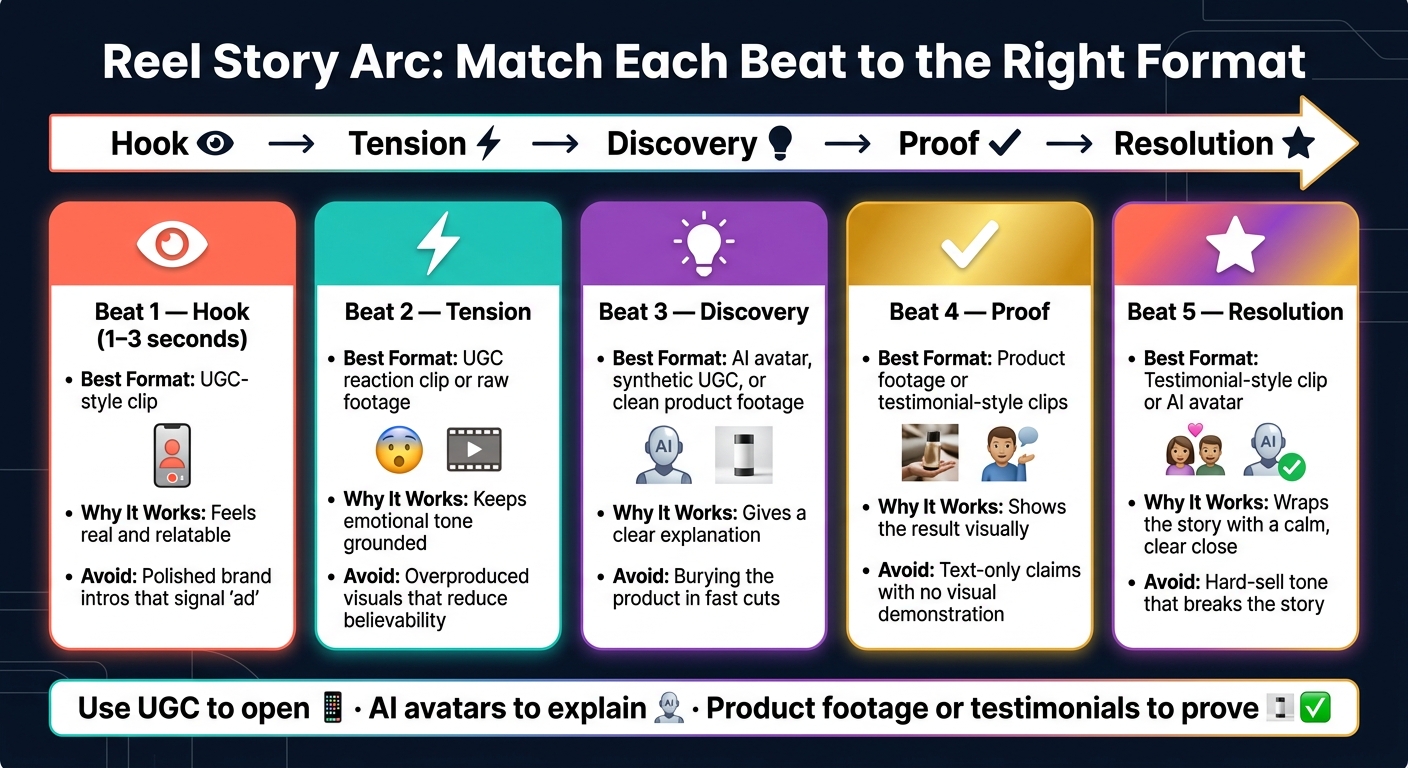
Reel Story Arc: Best-Fit Formats for Each Story Beat
Brands often start with the product. That’s usually a mistake. People pause for a story, not a product-first sales pitch.
A better way is to build the Reel around your customer’s situation, not your product’s feature set.
Use five beats to move from problem to product to proof: Hook → Tension → Discovery → Proof → Resolution. Once that arc is in place, you can focus on the order of the opening, the product reveal, and the CTA.
Hook, Tension, Discovery, Proof, Resolution
Each beat has one job. And each one needs to happen fast.
Hook (first 1 to 3 seconds): Start with a familiar problem, a sharp visual, or a bold claim. Don’t bring up the brand yet.
Tension: Turn up the pressure. Let the viewer sit with the problem for a moment before you move to the answer.
Discovery: Once the problem is clear, the product shows up. It should feel like the answer, not an ad.
Proof: Show what happens next. Use a demo, product footage, or a visible result so people can see the benefit instead of just hearing about it.
Resolution: The problem is solved. End on a positive note.
Match Each Story Beat to the Right Format
Each format does a different job. Match it to the beat it supports.
| Story Beat | Best-Fit Format | Why It Works | What to Avoid |
|---|---|---|---|
| Hook | UGC-style clip | Feels real and relatable | Polished brand intros that signal "ad" |
| Tension | UGC reaction clip or raw footage | Keeps the emotional tone grounded | Overproduced visuals that reduce believability |
| Discovery | AI avatar, synthetic UGC, or clean product footage | Gives a clear explanation | Burying the product in fast cuts |
| Proof | Product footage or testimonial-style clips | Shows the result visually | Text-only claims with no visual demonstration |
| Resolution | Testimonial-style clip or AI avatar | Wraps the story with a calm, clear close | Hard-sell tone that breaks the story |
UGC-style clips tend to work best at the start because they feel unscripted. AI avatars fit the parts where clarity and consistency matter most. Product footage and testimonial-style clips work best in the proof beat, where the viewer needs to see the result.
With the story arc in place, the next step is the order of the opening, product reveal, and CTA.
Get the Opening, Product Reveal, and CTA in the Right Order
Now tighten the flow. Start with the problem, show the product once the viewer gets that problem, and finish with one clear CTA.
The sequence is simple: hook, product reveal, proof, CTA.
Open With a Visual Problem or a Direct Claim
Start with bold movement and sharp contrast. Show a problem the viewer can spot right away. That first moment has to land fast.
UGC-style clips work well here because they feel unscripted. They also help stop the viewer from clocking the Reel as an ad too soon.
Introduce the Product After the Problem Is Clear
Bring in the product only after the problem is obvious. That way, it feels like the natural answer instead of a random interruption.
Keep the visual style steady from the hook into the reveal. If the opening feels casual and handheld, the next shot shouldn’t suddenly look like a totally different ad. AI avatars can help here because they explain the product in a clear, on-brand way without breaking the flow.
Place One CTA After the Value Is Delivered
Use one CTA, and place it after the proof. First show the result with product footage or testimonial-style clips. Then ask the viewer to take action.
The CTA should lead with the benefit, not just the action itself.
Use UGC to open, AI avatars to explain, and product footage or testimonials to prove.
Treat this sequence like a checklist for your Reel workflow.
Build a Production Workflow You Can Repeat
Once your Reel flow is in place, turn it into a process your team can run again and again. That’s the whole game. A Reel plan falls apart fast if it depends on last-minute guesswork.
A Simple Checklist for Writing and Reviewing Reels
Start with one audience problem and one clear benefit. Then give each beat one format. That keeps the Reel from feeling messy or overloaded. It also makes scripting a lot easier.
Write a few hook versions for every Reel so you can test which opening gets people to stop scrolling. Sometimes a small change in the first line makes all the difference.
Use that same story structure during script review. Check for these points:
- Does the product show up in a natural way after the problem is clear?
- Does the proof clip or testimonial back up the claim you made?
- Is there one benefit-led CTA at the end?
Then tailor pacing, captions, framing, and video length for each channel. A Reel that works on one platform may need a different cut somewhere else.
How Sun Scroller Fits This Workflow
If you want someone to handle this workflow every month, this is one way to do it.
For teams that want monthly production managed from start to finish, Sun Scroller creates AI avatars, synthetic UGC, AI B-roll, product ads, and cinematic storytelling in your brand voice.
The approval workflow gives your team a way to review and approve videos before anything goes live. After approval, Sun Scroller publishes to major social platforms. Channel-level analytics show how each approved version performs, so your team can improve the next round of content.
Conclusion: Clear Story, Natural Product, Simple CTA
Start with a problem. Set the scene first, then bring in the product. Show one clear win, and close with one CTA. When each part does just one thing, the Reel stays fun to watch, the pitch doesn’t feel forced, and the format is easy to use again.
Entertain first. Sell second. Then let the CTA land as the next logical step.
FAQs
How long should each part of a Reel be?
Keep a Reel fast-paced so people don’t swipe away. Open with a strong first 2 to 3 seconds, keep the core message tight, work the product mention in naturally around the middle, and use the last 3 to 5 seconds for a clear call to action.
Sun Scroller can help with this through done-for-you AI video services built around these timing structures.
What makes a strong hook in the first 3 seconds?
A strong hook creates instant visual or story-driven intrigue that makes people stop scrolling. Use fast movement, a sharp question, or a clear promise of value that fits your brand story.
If it fits, Sun Scroller can help make that opening scene feel polished and engaging through cinematic storytelling or AI-driven visuals. That sets the tone before the product mention and call to action.
How do I test different hooks and CTAs?
Use A/B testing and change one variable at a time. That means making a few versions of the same Reel and swapping just one thing, like the opening hook or where the CTA shows up.
Then watch the numbers that matter:
- Retention for hooks
- Click-through rate for CTAs
This gives you a cleaner read on what’s working and what’s not.
Sun Scroller can help you make these variations with AI avatars and synthetic UGC, publish them, and analyze which combinations drive the most engagement.