
CTA Design for TikTok, Reels, Shorts

CTA Design for TikTok, Reels, Shorts
I reuse the video - not the same call to action across all 3 platforms. I choose one next step, show why it’s worth taking, and keep the prompt clear of captions and app controls.
Here’s where I start:
- TikTok: A short prompt to comment, follow, save, or share.
- Instagram Reels: A save, share, message, or profile prompt that fits the video.
- YouTube Shorts: A subscribe or watch-next prompt, using a related video rather than a non-clickable description URL.
Quick Comparison
| CTA choice | TikTok | Reels | Shorts |
|---|---|---|---|
| Text | Short and action-led | Readable brand text | Clear next step |
| Timing to test | After the payoff | Short closing beat | After the takeaway |
| Placement | Clear of tabs, captions, and side controls | Clear of captions and side controls | Clear of Subscribe, related-video links, and side controls |
| Destination | Active profile link or eligible Shop page | Messages or active bio link | Related video or channel |
I keep subtitles separate from CTA text and check each destination before posting. For paid ads, I match the button to the promised page.
Then I test one CTA change at a time - wording, placement, timing, or destination - and measure the action I asked for. <u>Views alone don’t tell me whether a CTA worked.</u>
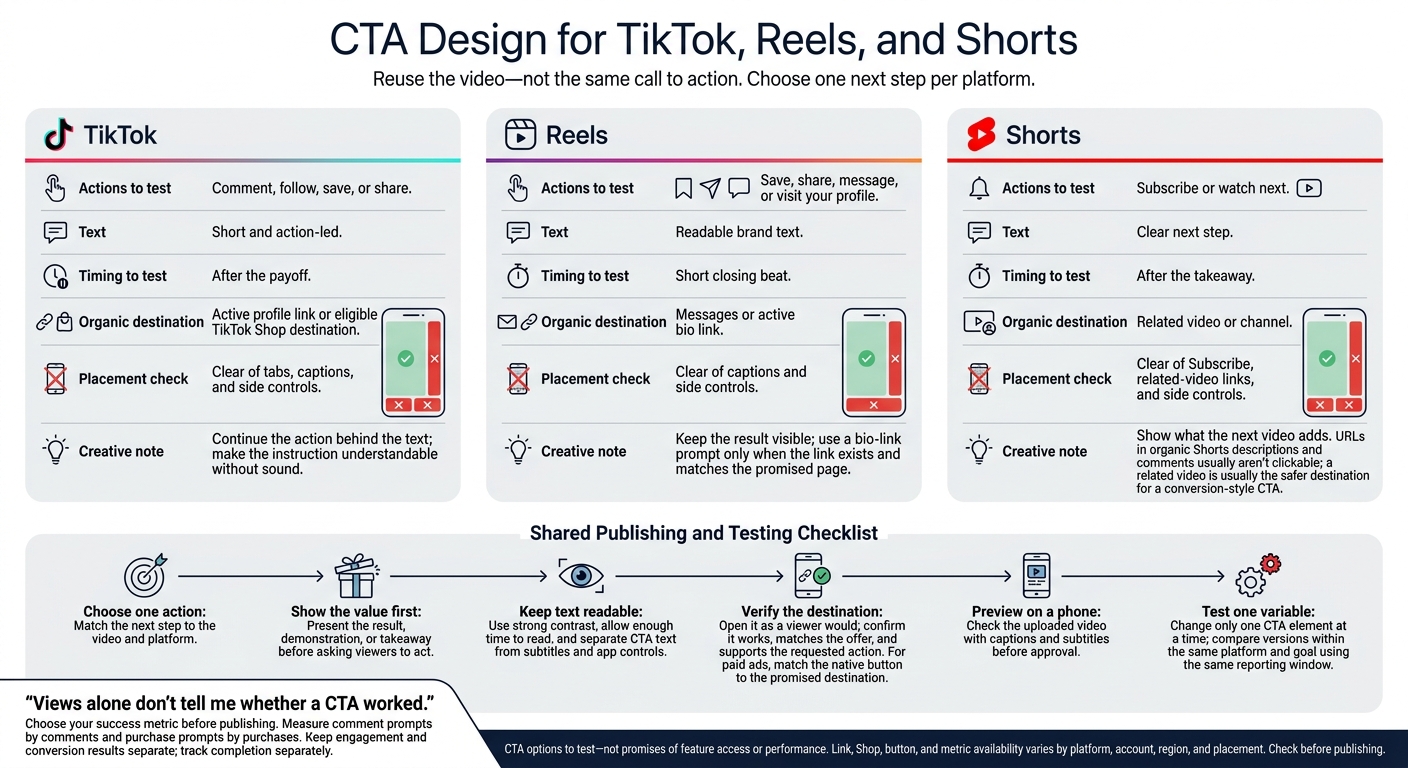
CTA Design for TikTok, Reels, and Shorts
TikTok vs. Reels vs. Shorts: CTA Formats and Links
Organic CTAs rely on actions built into each app. Paid ads can add a destination button. Access varies by account, region, and placement, so check every link, Shop feature, and button before writing your CTA. Ask viewers to take an action they already expect on that app.
| CTA goal | TikTok | Instagram Reels | YouTube Shorts |
|---|---|---|---|
| Engagement | Ask viewers to comment. | Ask viewers to save or share using native controls. | Ask viewers to subscribe using the channel control. |
| Discovery | Ask viewers to follow or visit your profile. | Send viewers to your profile. | Send viewers to your channel or a related video. |
| Conversion: organic | Point to an active profile link or eligible TikTok Shop destination. | Invite messages or bio-link visits. | Send viewers to a related video, not non-clickable description or comment URLs. |
| Conversion: paid | Match the ad button to the shop or landing page. | Match the ad button to the promised destination. | Use the ad’s native button and destination. |
These are CTA options to test - not promises of feature access or performance.
Use the platform notes below to choose your CTA wording, placement, and links. On TikTok, start with a short prompt viewers can act on right away.
TikTok: Use Short, Action-Led Prompts
Lead with the benefit or proof, then ask viewers to act. Keep the prompt short and leave it visible long enough to read. Skip a separate end card, and make sure the instruction makes sense without sound.
Instagram Reels: Prompt Saves, Shares, Messages, or Profile Visits
Match the action to the content’s purpose. Ask for saves and shares when the material is useful, messages for business inquiries, and profile visits for more information. Show the next step on screen in readable brand text.
Add subtitles for spoken instructions, and put extra details in the post caption. Mention a bio link only if it exists and takes viewers to the promised page.
YouTube Shorts: Guide Viewers to Related Videos or Your Channel
Tell viewers what to watch next: a related video with more detail or more content on your channel. Keep the prompt short. URLs in organic Shorts descriptions and comments usually aren’t clickable, so a related video is usually the safer destination for a conversion-style CTA.
Before approval, open each destination as a viewer would. Test the profile link, related video, or ad landing page - not just the URL in the brief. Before publishing, confirm that the destination works, matches the offer, and lets viewers take the requested action.
Compare CTA Text, Placement, Timing, and Captions
Keep the CTA goal consistent, but adjust its text, placement, timing, and captions to fit each app’s controls.
| Production choice | TikTok | Instagram Reels | YouTube Shorts |
|---|---|---|---|
| Text treatment | Short action prompt in bold, readable text | Short branded CTA | Short watch-next prompt |
| Safe-zone checks | Check right-side controls and lower caption area | Check side controls and bottom caption area | Check side controls and the related-video area |
| Timing | Prompt right after the payoff | Use a short closing beat | Prompt after the takeaway |
| On-screen instructions | Ask for one immediate action | Prompt saves, shares, or messages | Identify what viewers should watch next |
| Subtitles | Keep CTA text clear of dialogue and controls | Separate dialogue from the closing prompt | Leave room for dialogue and the Subscribe button |
| Native action | Like, comment, share, or profile visit | Like, comment, share, or profile visit | Subscribe, share, or watch next |
Keep CTA Text Readable and Clear of Controls
Use strong contrast and text viewers can read on a phone without zooming. Keep key wording, logos, and product details away from edges covered by app controls. Preview the uploaded video with captions and subtitles to check that the CTA remains visible.
Time the CTA After Showing Its Value
Show the result, demonstration, or takeaway before asking viewers to act. Keep the prompt visible long enough to read once. Use platform analytics to compare CTA start times and how long each prompt stays on screen.
| Platform | Timing choice to test | Keep the ending useful |
|---|---|---|
| TikTok | Prompt right after the payoff | Continue the action behind the text |
| Reels | Use a short closing beat | Keep the result visible |
| Shorts | Prompt after the takeaway | Show what the next video adds |
Give each layer one job so the CTA doesn’t compete with the rest of the video.
Give CTA Text, Subtitles, and Post Captions Separate Roles
Spoken lines set the tone, while on-screen CTA text keeps the next step visible. Subtitles carry the dialogue. Post captions or descriptions provide context, and native buttons let viewers act.
Use readable line breaks and keep subtitles separate from CTA text. Make the next step clear - viewers shouldn’t have to guess what to do.
Test CTAs by Platform and Goal
Once you’ve set the text, placement, and timing, test your CTA against the action you want viewers to take. Choose your success metric before publishing: measure comment prompts by comments and purchase prompts by purchases. Track completion separately from conversions.
| Platform | CTA goal | Measures to review | Tracking needs and limits |
|---|---|---|---|
| TikTok | Start a conversation or encourage sharing | Comments, shares | Use native analytics for available engagement metrics. |
| Instagram Reels | Encourage saves, shares, or profile interest | Saves, shares, profile visits where available | Use native analytics for engagement and profile activity. |
| YouTube Shorts | Build channel interest or drive related-video views | Channel visits, related-video clicks where available | Check which destination metrics native analytics report. |
| All three | Send viewers to a destination | Clicks where reported | Combine native reporting with tagged links and website analytics. |
| All three | Generate leads or sales | Completed sign-ups, purchases | Use website conversion tracking; engagement alone cannot confirm these outcomes. |
Available metrics vary by platform and account.
Change 1 CTA Variable at a Time
With your goal set, change only one CTA variable per test: wording, placement, destination, or voiceover versus on-screen text only. Keep everything else the same. Record what changed, then compare versions within the same platform and goal.
Compare action rates using the same reporting window. Keep engagement and conversion results separate, and track completion rate alongside both.
Produce and Review CTA Versions With Sun Scroller
For batch testing, create clearly labeled versions that each change just one CTA element. Sun Scroller’s brand review controls let you approve CTA wording, placement, and destination before publishing.
Use platform analytics and conversion data to guide your next batch. Keep traffic, engagement, and sales separate.
Conclusion: Choose 1 Action and Check the Destination
After comparing formats, choose one action per platform that fits how people use it: interaction on TikTok, saves or shares on Reels, and subscriptions or channel growth on Shorts. Then test the action on each platform.
Before publishing, do one last check: make sure the CTA asks for one action; align its text, timing, and placement; verify the destination; keep text clear of controls; check subtitles; and preview the phone view before approval.
After posting, track the target action - not just views - and use each channel’s analytics to choose your next CTA test.
FAQs
How do I choose a CTA for my audience?
Make sure your CTA supports your brand goals and tells viewers what to do next, whether you’re aiming for conversions or brand awareness. Keep its tone and voice consistent with your brand style guide.
Sun Scroller develops your brand voice and style guide in the first month, then tailors AI-generated video scripts and visuals to your audience. You stay in control: you review and approve all content before it goes live.
How can I check CTA safe zones on different phones?
Use platform-specific templates or overlay guides from TikTok, Instagram, and YouTube to check where captions, profile icons, and like buttons sit across different screen aspect ratios. Before publishing, preview your video in each app’s draft mode to make sure overlays don’t block your CTA.
Sun Scroller simplifies this process by producing and optimizing multi-format content with CTA placement in mind.
How much data do I need to compare CTA tests?
Sun Scroller estimates use a baseline of about 1,500 views per video per channel to make meaningful CTA comparisons across TikTok, Reels, and Shorts.
Statistical thresholds depend on your audience. Results also vary by brand, niche, and market. Check each channel’s analytics to make sure your sample accounts for natural differences in reach and engagement before deciding which CTA formats drive the most traffic.