
How to Design AI UGC Creator Personas
How to Design AI UGC Creator Personas
If I want AI UGC videos to stay consistent, I start with the persona - not the script.
Here’s the short version: I pick 1 campaign goal, 1 audience segment, 1 creator role, and 1 fixed on-camera setup. Then I carry those same choices into the script, visual prompt, test clips, and review process. That simple order helps me cut rework, keep the creator steady from clip to clip, and catch brand or legal issues before posting.
A strong AI UGC persona usually comes down to four steps:
- Set one goal like clicks, sign-ups, purchases, or product education
- Match one audience by age, life stage, interests, pain points, and product awareness
- Fix on-screen traits like wardrobe, energy, gestures, and camera behavior
- Test one variable at a time so I can see what changed and why
This matters because short-form video moves fast. On TikTok, Instagram Reels, and YouTube Shorts, viewers often decide in 1–3 seconds whether to keep watching. If the creator’s look, tone, or role shifts too much, the content can feel off fast.
I also keep review simple before anything goes live:
- Does the creator still look like the same person?
- Are the product details right?
- Is the audio and video clean?
- Are claims and likeness approvals cleared?
In other words: I treat the persona like a fixed blueprint. The script and prompt should follow it, not fight it. That is the core idea behind the full workflow below.
How to Design AI UGC Creator Personas: 4-Step Workflow
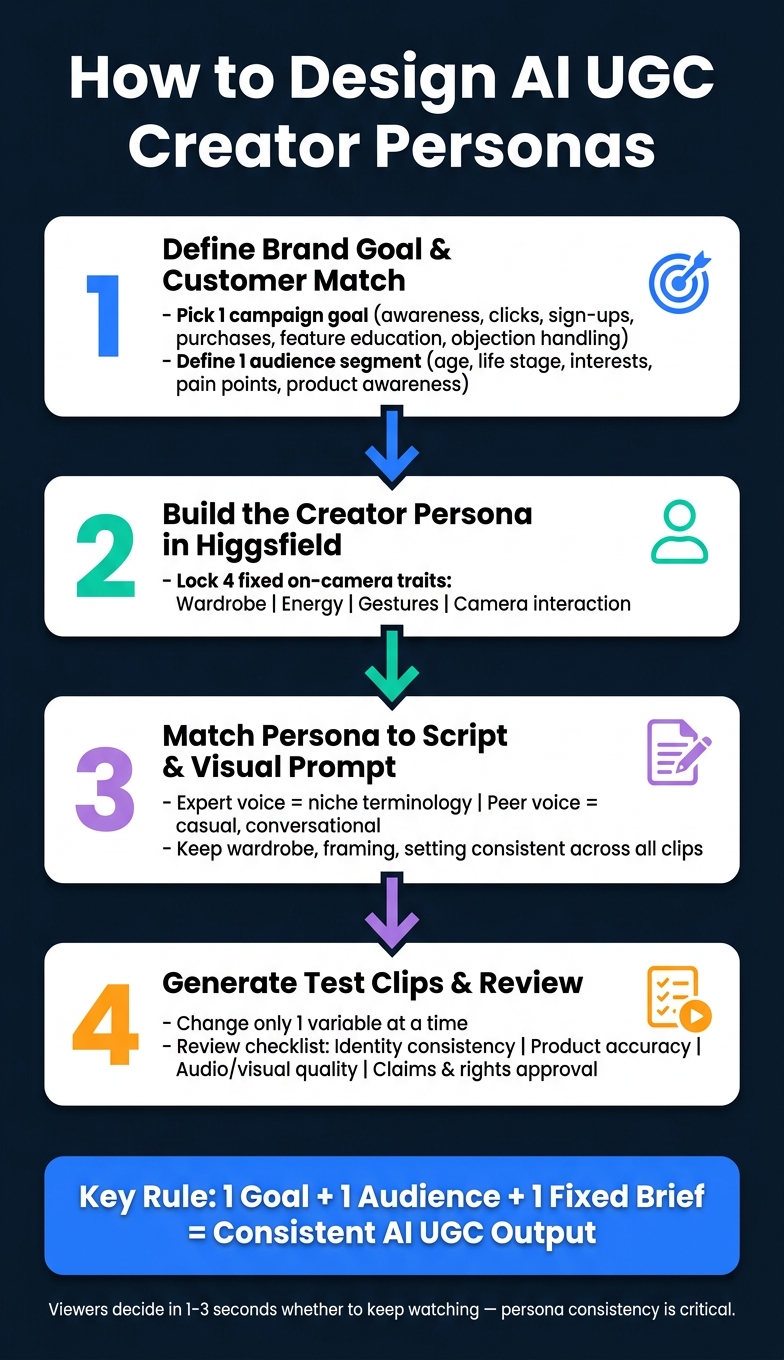
1. Define the Brand Goal and Customer Match
Before you build the persona in Higgsfield, write a short brief with one campaign goal and one audience segment. Start with the goal. Then narrow the audience.
Choose one goal: awareness, clicks, sign-ups, purchases, feature education, or objection handling. A persona built around a single goal leads to tighter scripts and more steady output.
Then write down the audience details. Include their age range, life stage, interests, pain points, and how familiar they are with your product. The more specific you get, the easier the role is to write - and the more believable it feels.
Pick One Campaign Objective and One Customer Segment
Keep the persona focused on one job. Narrow the scope before you build anything. Define the customer segment as tightly as you can, then make sure the persona speaks to that segment’s needs.
That level of detail shapes the script, the visual style, and the tone. If the segment is too broad, the persona can drift and the content starts to feel generic.
Once the segment is clear, turn it into a creator role.
Turn the Audience Profile into a Creator Role
After you have the audience profile, translate it into a creator role that fits the segment. The role should line up with how that group talks, learns, and buys. In plain terms, the persona should feel like someone that audience would actually listen to.
Make the role believable to the segment so the content feels natural, not forced.
Use that role to define the fixed traits in Higgsfield.
2. Build the Creator Persona in Higgsfield
Once you’ve got the audience profile and creator role from Step 1, pause for a minute and write a short persona brief before you open Higgsfield. The goal here is simple: turn that creator role into a fixed on-camera brief.
Keep it tight and visual. Focus on the traits people can actually see on screen, like wardrobe, energy, gestures, and how the person interacts with the camera. Those clear rules help the persona stay the same across clips instead of drifting from one video to the next.
Lock the Persona Traits That Stay the Same Across Videos
At this stage, lock in the traits that shouldn’t change between videos. That usually means:
- wardrobe
- energy
- gestures
- camera interaction
Think of it like giving the creator a repeatable on-screen identity. If those traits keep shifting, the character can start to feel like a different person from clip to clip.
Use this brief as the fixed input for the script and visual prompt in the next step.
3. Match the Persona to the Script and Visual Prompt
Once the persona traits are set, carry them straight into the script and the prompt. The persona brief should guide both. That way, the words and the visuals point in the same direction instead of feeling stitched together.
Write Scripts That Fit the Creator's Role and Credibility
Match the script to the persona's role, audience, and credibility level. An expert voice should sound like someone who knows the space and uses the terms people in that niche expect. A peer-style creator should sound more casual and easy to follow, like a smart friend explaining something clearly.
In Higgsfield, keep the persona's voice and visual cues steady so each clip feels like it comes from the same creator. If the tone shifts too much from one video to the next, people notice. It’s a bit like watching the same actor play two different characters without warning.
Build Reusable Visual Prompts for Consistent Output
Keep the same wardrobe, framing, setting, and camera behavior across clips so the persona stays recognizable.
Then generate test clips and check whether the persona still reads as the same creator on screen.
4. Generate Test Clips and Complete the Review Process
Once the persona, script, and visual prompt are set, start small. Create a batch of test clips and change just one variable at a time - the persona, the script, or the visual prompt.
That makes it much easier to see what's working and what's throwing things off. If you change everything at once, it's hard to tell which part caused the result.
Check Identity Consistency, Product Accuracy, and Delivery Quality
As you review the test clips, use a simple checklist:
| Review Criteria | What to Check |
|---|---|
| Identity consistency | Does the creator stay aligned with the same persona from clip to clip? |
| Product accuracy | Are the product name and key details correct? |
| Audio/visual quality | Do the audio and visual elements feel polished and easy to follow? |
| Claims and rights | Are claims accurate and likeness use approved? |
If something feels off, flag it before moving on. That could be a drift in the creator's persona, a product detail that's wrong, rough audio, or a rights issue that still needs approval.
Get Brand, Legal, and Publishing Sign-Off Before Posting
If the clips pass the checklist, send them to sign-off. In plain terms: once the test clips clear review, they should go to brand, legal, and publishing before anything gets posted.
Sun Scroller can help manage async approvals and publish approved videos across YouTube, TikTok, Instagram, Facebook, X, and LinkedIn.
Conclusion: A simple workflow for repeatable AI UGC personas
In practice, this workflow is pretty simple: build the persona around one goal, one audience, and one fixed on-camera brief. Then carry that same structure through the script, prompts, and review.
That sequence is what makes the system work. Change too many things at once, and the persona can drift. Keep the setup tight, and the output stays more consistent from one video to the next.
For teams producing at volume, Sun Scroller handles synthetic UGC production, brand review, and multi-platform publishing across YouTube, TikTok, Instagram, Facebook, X, and LinkedIn.
FAQs
How detailed should a persona brief be?
A persona brief should go deep. The more detail you give, the easier it is to make synthetic UGC line up with your brand goals.
Spell out the persona’s traits. Match that persona to your target customer. Show how the person should fit the script. And add clear visual prompts so the final video looks the way you want.
That level of detail helps keep your video assets consistent from one piece to the next.
If you want a simpler path, Sun Scroller can take care of persona design, AI avatar creation, and multi-platform publishing, with brand review controls built in.
What should I test first in a new AI UGC persona?
Test the script fit first. You want to make sure the persona’s tone, language, and delivery line up with your brand goals and the audience you’re trying to reach.
Once that checks out, create a few test clips. That lets you review visual consistency and see how the persona performs before you use it across more content.
Who should approve AI UGC videos before posting?
Before you publish AI-generated UGC, run each video through your brand’s internal review process. That step helps make sure the content matches your goals, voice, and quality bar.
Sun Scroller supports that workflow with brand review controls, so your team can check and approve content before it goes live across your social media channels.