
7 Voiceover Hooks for AI Video Ads
7 Voiceover Hooks for AI Video Ads
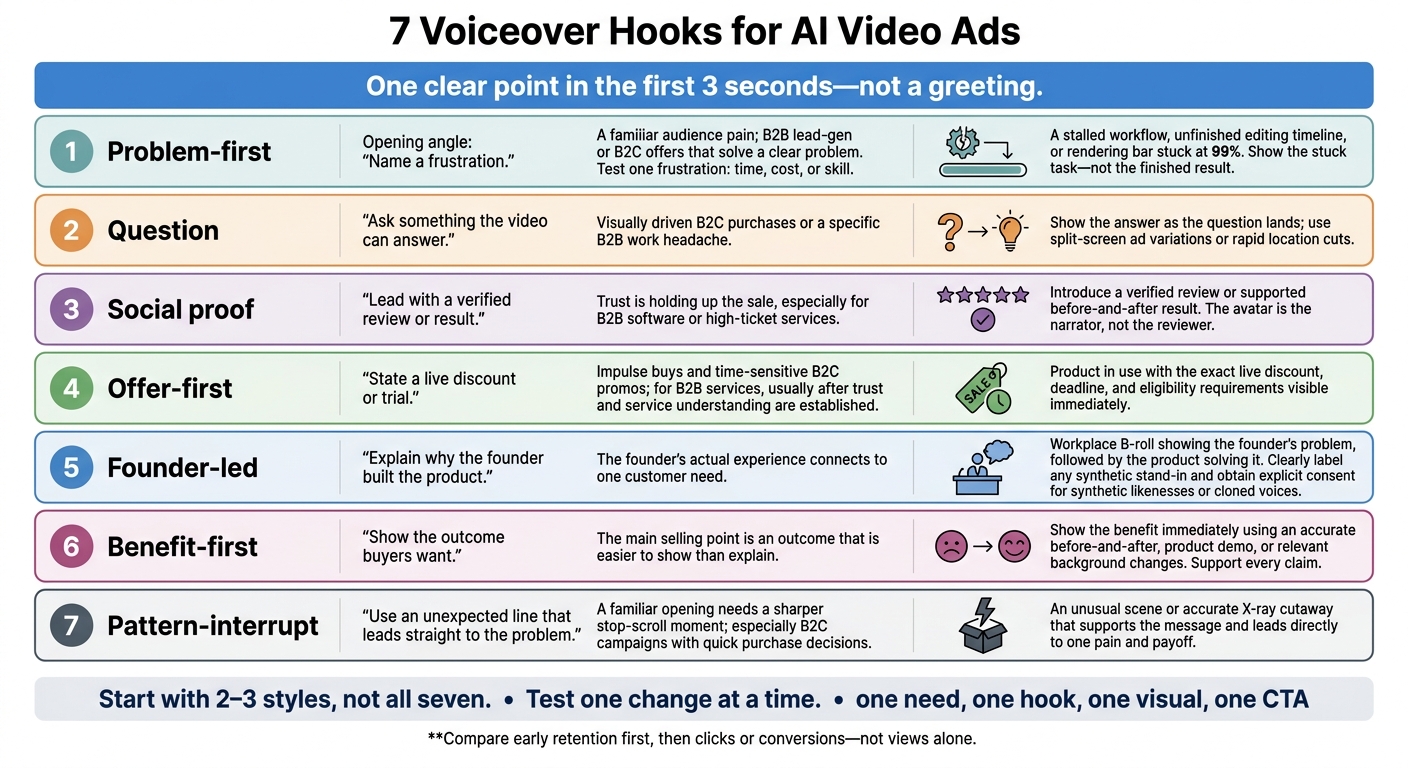
I start AI video ads with one clear point in the first 3 seconds - not a greeting. My approach: pick one audience need, match the opening line to the visual, and test 2–3 hook styles before making more versions.
Here are the seven options I use:
- Problem-first: Name a frustration.
- Question: Ask something the video can answer.
- Social proof: Lead with a verified review or result.
- Offer-first: State a live discount or trial.
- Founder-led: Explain why the founder built the product.
- Benefit-first: Show the outcome buyers want.
- Pattern-interrupt: Use an unexpected line that leads straight to the problem.
I keep the rest of the ad focused on one promise, proof, and one next step. For timing, I aim for 30–40 spoken words in 15 seconds or 60–80 in 30 seconds, then check the full read.
<u>My rule: test one change at a time.</u> I compare early retention, then clicks or conversions - not views alone. Before publishing, I check claims, offers, captions, and consent for synthetic voices or likenesses. Monthly results guide the next set of ads.
7 Voiceover Hooks for AI Video Ads
Focus Each Script on 1 Audience Need
A strong hook works only if the rest of the script stays focused on the same need.
Choose one need and make one promise you can back up. Let that need guide which benefit you highlight. Cut any features that don’t support it, and keep the hook, proof, and final call to action tied to that need.
Build the voiceover in this order: hook, context, product benefit, proof, next step. Start with the hook. Use context to name the problem, then explain how the product helps. End with one clear action.
Back up your promise by showing the product at work, a verified review, or a before-and-after result.
Write for the ear, not the page. A 30-second voiceover is about 75 words, so keep sentences short and punctuation clean.
Keep the narration and visuals in sync through the final frame. The on-screen action should match the single next step in the voiceover.
1. Problem-First Hook
Use this hook when your audience already feels the pain and needs you to name it fast.
Audience and Campaign Fit
Lead with a frustration your audience already knows. Problem-first hooks work best for B2B lead-gen ads and B2C offers that solve a clear problem, whether you're promoting a brand or a product. Test one frustration at a time: time, cost, or skill.
Opening Voiceover Examples
“Still wasting hours creating videos for your brand?”
“Still editing the same ad for every platform?”
Matching Visuals
Pair the voiceover with a stalled ad workflow, such as an unfinished editing timeline or a rendering bar stuck at 99%. Show the stuck task - not the finished result.
Writing Tips
Skip the warm-up line and open with the exact pain. Name it in the first 3 seconds, then move to the solution. Keep the same structure for each hook type, but change the opening angle.
2. Question Hook
A question can draw viewers in when a problem-first hook feels too direct.
Audience and Campaign Fit
Ask something viewers want answered visually. This approach works well for B2C product ads with fast, visually driven purchase decisions. It also suits B2B ads when the question points to a specific work headache. A direct question creates curiosity and helps stop the scroll. Keep it focused on one clear visual payoff.
Opening Voiceover Examples
“Want to see one product become five different ads?”
“How do you turn one studio shot into 50 cinematic locations?”
Matching Visuals
Show the answer as the question lands. Use a split-screen to show ad variations or rapid AI location cuts to show range.
Writing Tips
Keep the question to 8 words or fewer, leading to one answer and one CTA. Never open with a logo or a polite greeting.
3. Social Proof Hook
Audience and Campaign Fit
When curiosity isn’t enough to convert, lead with proof. Give buyers a reason to believe from the first line.
Social proof works well when a lack of trust holds up the sale, especially for B2B software and high-ticket services. Buyers need evidence before they commit, so choose proof that supports the outcome your offer promises.
Opening Voiceover Examples
“Here’s what customers are saying.”
“See the result for yourself.”
Matching Visuals
Have the AI presenter introduce the proof, then cut to the review or before-and-after. The avatar is the narrator, not the reviewer. Never suggest otherwise, and make sure the on-screen evidence supports the voiceover claim.
Writing Tips
Use verified reviews, and get explicit permission before featuring names or likenesses. Support every claim with data and get human approval before publishing.
If the proof takes too long to land while viewers scroll, use the next hook style for a faster opening.
4. Offer-First Hook
Audience and Campaign Fit
Lead with the offer for impulse buys and time-sensitive B2C promos. For B2B services, offer-first hooks usually work better after you’ve built some trust and explained the service.
Opening Voiceover Examples
Keep the opening line short and specific. Use these examples only when the offer is live.
“20% off ends October 11.”
“Start your free trial today.”
Matching Visuals
Show the offer on-screen as soon as the voiceover mentions it. Pair the product in use with the exact discount, deadline, and eligibility requirements. If the guarantee has conditions, keep them clear - don’t turn it into an unconditional promise of a free month.
Writing Tips
Deliver the opening hook within the first 0–3 seconds. Match the on-screen text to the voiceover exactly, keep the offer visible and easy to read from the start, and end with one CTA.
5. Founder-Led Hook
A founder’s story can do more than present an offer. It can explain why the product exists.
Audience and Campaign Fit
Use a founder-led hook when the founder’s experience explains why they built the product. Tie that experience to one customer need.
Opening Voiceover Examples
Use these lines only if they match the founder’s actual experience:
“I built this because our team needed a faster way to make videos.”
“We kept hitting the same problem, so I built this.”
Matching Visuals
Show workplace B-roll that reflects the founder’s problem, followed by the product solving it. Get explicit consent for synthetic likenesses or cloned voices. If you use a synthetic stand-in, label it clearly and stay true to the founder’s story.
Writing Tips
Keep the opening short: start with the founder’s real problem, show how the product solves it, then name the customer benefit. Before publishing, get the founder’s approval on the story, voice, likeness, and final cut.
6. Benefit-First Hook
Audience and Campaign Fit
Use this hook when the outcome is easier to show than explain - and it's the main selling point. Lead with what the buyer wants. Pick one outcome and prove it on screen.
Opening Voiceover Examples
Use these lines only if the claims are true.
“Create polished video ads without booking a studio.”
“Get professional product shots in 50+ cinematic locations without a reshoot”
Matching Visuals
Show the benefit right away. For a transformation, use an AI-generated before-and-after that accurately reflects the outcome. If the hook explains how it works, show a close-up demo or cutaway.
For a claim about multiple locations, swap backgrounds to show the same product in different cinematic settings.
Writing Tips
Focus the opening on one outcome. Deliver the hook in the first 3 seconds - about 8 words. Lead with the benefit, follow with proof, and cut any claim you can't support.
If the benefit needs more momentum, try the pattern-interrupt hook next.
7. Pattern-Interrupt Hook
Use this when a standard opening feels too familiar and needs a sharper stop-scroll moment.
Audience and Campaign Fit
An unexpected line and an unusual scene break a familiar ad pattern. This works best for B2C product campaigns with quick purchase decisions. The surprise needs to lead straight to one audience pain and one payoff.
Opening Voiceover Examples
Make the hook unexpected, but keep it focused on one clear need.
“Your razor shouldn’t hurt your budget.”
Stop throwing away your money on cheap razors.
Matching Visuals
Pair the voiceover with an x-ray cutaway that shows the benefit as the line lands. The visual should support the message, not distract from it.
Writing Tips
Tie the surprise to one clear pain, then deliver the payoff and solution right away. Check that the script and visuals stay on-brand. Then time the opening to the first beat of the edit.
Time the Voiceover and Test Each Opening
Once you choose a hook style, match its timing to the edit and test one opening variable at a time.
Aim for 30–40 spoken words for a 15-second ad and 60–80 for a 30-second ad. Time the entire read, including pauses, before you lock the edit.
For a 30-second ad, give the hook 0–3 seconds, the problem 3–10 seconds, the solution and proof 10–25 seconds, and the CTA 25–30 seconds. Cut words if the delivery sounds rushed.
Spell out unfamiliar acronyms if the voice has trouble saying them, and check brand-name pronunciation. Preview the synthetic voice to check emphasis, tone, and pauses. Adjust the script or voice settings as needed, then line up captions and visuals with the spoken message - especially when the call to action lands.
Keep the body, offer, audience, and placement the same. Test one change at a time to see whether wording, visuals, or voice affects performance.
| Test variable | What to keep consistent | Metric to review |
|---|---|---|
| Opening wording | Opening visuals, body, offer, audience, placement | 3-second retention, click-through rate |
| Opening visuals | Voiceover script, body, offer, audience, placement | 3-second retention, clicks or leads |
| Voiceover tone | Script wording, visuals, offer, placement | Audience trust, conversion rate |
Compare early retention first, then clicks or conversions. Higher 3-second retention doesn’t guarantee more conversions. Judge the opening by the campaign goal and placement, not retention alone.
Produce and Review Monthly Hook Variants
Once you’ve tested individual openings, use the winners to build a monthly variant brief. Choose one hook type, one audience need, one offer, and approved product facts. Sun Scroller’s pipeline can produce B-roll, voiceovers, and synthetic UGC without brand filming.
Sun Scroller’s AI Hook Matrix can generate up to 100 ad variants from 20 visual hooks and 5 voiceovers. You don’t need to publish every combination. Label each variant by its opening visual and voiceover so you can link results to the right ad.
Verify every spoken claim against supporting evidence. Check that product X-ray cutaways show accurate construction and that before-and-after visuals show realistic results. Synthetic presenters and cloned voices should match the approved brand look and voice. Synthetic UGC is AI-generated content, not genuine customer testimony. Don’t suggest that an invented customer used the product.
Use the approval step to request changes and approve each finished hook variant before it goes live on approved channels. Review the final edit, captions, voiceover, and offer together - not just the script. Then publish the approved versions and track which openings win.
Review channel results monthly after publishing. Sun Scroller’s per-channel analytics can help you identify which hook variants drove clicks or leads. Keep results separate by platform, record which variants need another test, and use those findings to shape the next brief.
Conclusion: Choose and Refine Your Hooks
After testing, choose the hook that addresses your immediate need: problem-first for pain, question for curiosity, social proof for trust, offer-first for value, founder-led for origin, benefit-first for payoff, or pattern-interrupt to stop the scroll.
Start with 2–3 styles, not all seven. Give each opening one matching visual.
Use conversion results - not views alone - to refine your openings. Keep claims true and narration natural: one need, one hook, one visual, one CTA. Make the next step clear on screen.
FAQs
How do I choose a hook for a new audience?
Start with your business model: B2C product businesses and B2B service businesses need different advertising approaches.
Open with a pattern-interrupt hook: a bold statement, an unusual visual, or a direct callout to your audience - not a logo or a polite greeting. Match the format to what you sell. Use visual demonstrations for products and trust-building content for services. Grab attention within the first three seconds.
How much data do I need to pick a winning hook?
Test multiple variations, not just one video. Sun Scroller’s Hook Matrix pairs 20 visual hooks with 5 voiceovers to create up to 100 ad variants. Testing those combinations against actual audience behavior helps you find a winning hook efficiently. Video performance varies, so structured testing works better than judging a single result.
When should I refresh a successful hook?
The provided search results don’t say when to update a successful hook or what criteria to use. Track your content’s reach and engagement to spot when the hook starts losing its pull and may need an update.